
Save the complete error, platform/version, timestamp and selected System before changing anything. Classify whether authentication, market data, order handling or account risk failed. Similar words can describe different stages; one phrase alone does not prove a root cause.
Educational software guidance. Trading involves risk. Read the financial and information disclaimers.
Route the symptom to the right check
| Symptom or message family | First useful check | Detailed guide |
|---|---|---|
| Login / FCM / permission | Issued credentials, System, account activation and interface permission | Login/FCM |
| Market data unavailable | Agreements, exchange/depth entitlement and direct/plugin route | Data connection |
| Connection lost / reconnecting | Preserve order state; inspect logs and advisories | Reconnect |
| Risk rejection | Full response and actual configured criterion | Risk rejection |
| Liquidation-only restriction | Account mode and provider-authorized clearing process | Liquidation only |
| Insufficient margin | Exact product/holding requirement and current exposure | Margin rejection |
| Position limit | Existing, pending and proposed signed quantity | Position limit |
| Invalid symbol | Root, exchange, dated expiry and receiver format | Symbol error |
| Market closed | Product/date/timezone and provider cutoff | Closed market |
| Incomplete history | Requested range, service cap and platform history source | History |
| Duplicate request | Reconcile original delivery, order and fill before retry | Duplicates |
These are diagnostic categories, not a claim that every platform displays identical error strings.
Two vendor-documented examples
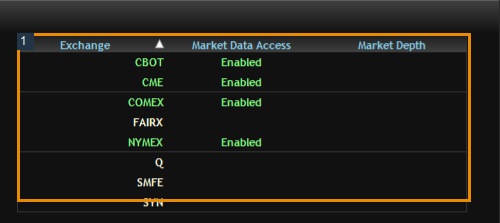
Sierra Chart's Rithmic service guide documents permission-denied messages both during logon and when accessing an exchange's book. The stage matters: an entitlement error is not proof the password was accepted for every service.
Bookmap's connectivity guide documents inconsistent MBO and delayed-data warnings. Do not treat its Continue option as proof the data remains suitable for an MBO-dependent strategy.
Preserve a useful incident record
Record what happened immediately before the message, the connection route, affected contract, account identifier privately, and whether other accounts or instruments were affected. Keep alert, recipient, order and fill timestamps separate. Redact secrets in public screenshots.
Before retrying an order-related action, inspect positions and outstanding orders. Before closing a local platform, determine whether it manages an active strategy or OCO relationship. Avoid generic fixes such as deleting data, disabling security, repeatedly logging in or clearing a provider restriction without authorization.
Screenshot references
Common questions
Is this every possible Rithmic error?
No. It is a diagnostic index with source-grounded examples, not an exhaustive error-code catalogue.
Does permission denied prove the password is correct?
No. Identify which service and operation returned it.
Should I retry a timed-out order?
First reconcile whether it was accepted or filled; a repeated action can duplicate exposure.
Who should receive the incident details?
The issuing provider for credentials/account/risk permission; the platform vendor for its connector/UI behavior, with relevant redacted logs.