
Check the issued Rithmic login and System, the intended data connection, exchange entitlement and any incomplete agreements. If another application is connected, determine whether it uses a direct session or a supported RTrader plugin. The message alone does not identify the cause and does not establish the status of positions or working orders.
Educational software guidance. Trading involves risk. Read the financial and information disclaimers.
What does FCM/IB mean?
An FCM is a futures commission merchant; an IB is an introducing broker. An error asking you to contact the FCM/IB points toward the account provider's support process. A funding-provider account may have its own route for getting that investigation performed.
Quantower's official issues guide lists several data-login causes. Its list is a diagnostic reference for Quantower, not proof of the cause in your account.
Work through the checks in order
| Check | What to inspect | Useful next step |
|---|---|---|
| Credentials/System | Issued trading login, exact System, accidental spaces | Correct a confirmed mismatch |
| Direct or plugin | Client route and whether the required host is connected | Follow the matching vendor setup |
| Another data session | Other apps, computers and allowed entitlement | Ask the provider which sessions are enabled |
| Agreements | Account's actual status in the supported agreement interface | Review the required agreement and truthful classification |
| Exchange access | Subscription for the exact exchange and depth needed | Ask the provider to confirm entitlement |
| Account status | Activation, expiration or disablement | Use issuer support rather than reinstalling blindly |
| Service/network | Dated notice and exact connection error | Preserve logs and investigate the matching service |
Do not invent an activation deadline. A vendor's estimated provisioning time is not a guarantee for every firm or account.
Find the separate native data section
Box 2 marks Market Data, its credential/System fields and Allow Plug-ins in the empty native form. Orders appears separately in box 1. The reference shows both services On and Plug-ins Off, but those values are not prescribed for every workflow.
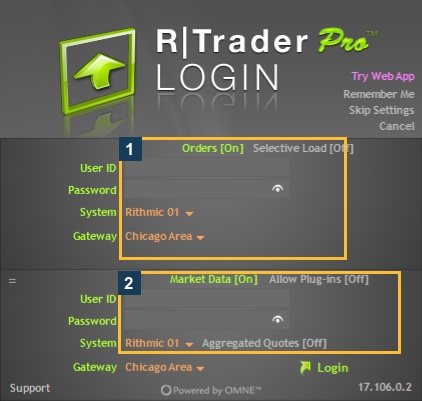
For example, Apex's setup article describes a data-off arrangement for its stated workflow. Quantower's plugin connection guide describes the required host/client route. Do not combine parts of those different arrangements into a universal recipe.
If login works but prices are missing
Check the exact contract and exchange, quote timestamp and type of data required. Top-of-book quotes and market depth are different access questions. A green data indicator is useful connection evidence but does not prove entitlement for every symbol.

If the failure concerns a plugin client, confirm the host is connected and the client selected that route. Sierra Chart's same-account limitation needs its own guide; its support response should not be replaced by generic plugin advice.
If positions exist, establish them through an available supported account interface or the provider. Missing prices do not prove that trading orders were canceled.
A useful escalation message
Give support the application/version, exact error, timestamp/timezone, System/Gateway, intended exchange/contract, direct/plugin route and what else uses the login. Ask it to confirm agreement status, data entitlement, account activation and simultaneous-session permissions. Omit passwords and remove private identifiers from shared screenshots.
Common questions
Does this error mean I must reinstall the platform?
No single cause follows from the message. Check settings, session route and provider access first; reinstall only under matching vendor guidance.
Should I select Non-Professional to make the error disappear?
Classification must be truthful and meet the applicable requirements. It is not a troubleshooting toggle. See market-data agreements.
Does a working chart prove I can trade?
No. Check the intended account, order route and permissions separately.
Is PickMyTrade a fix for this message?
No general fix is established. Its own Rithmic workflow has separate account and connection requirements.