
A risk-management rejection means the submitted order did not pass an account or product check. Preserve the full response, then compare the requested quantity, current exposure, available margin and account mode. The words “risk management” alone do not identify the failed rule.
Educational software guidance. Trading involves risk. Read the financial and information disclaimers.
Find the rejection and the affected account
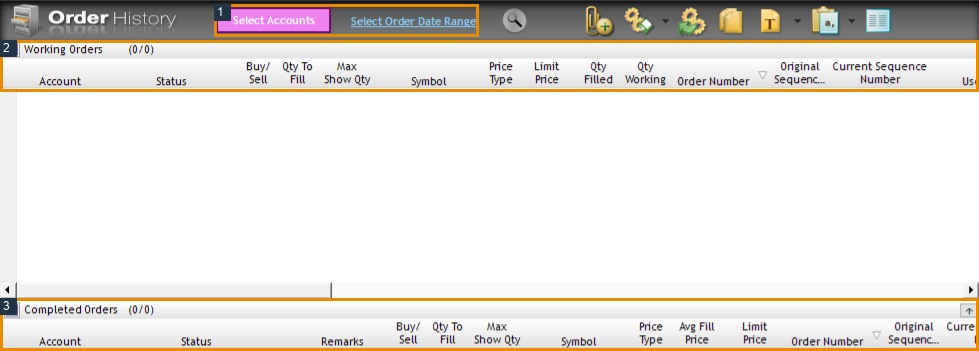
Open File → Order History in R Trader Pro. Use Select Accounts and Select Order Date Range to inspect the relevant account and session. Match the response time to the originating platform or alert log. A rejected replacement does not mean the original order was cancelled; inspect the working-order panel too.
Work through the possible checks
| Evidence in the response | Next check |
|---|---|
| Quantity or exposure limit | Account/product limit, open position and pending orders |
| Margin or buying power | Provider's current requirement for the exact contract and session |
| Liquidation-only or administrator restriction | Account mode and the provider's release procedure |
| Price or tick increment | Instrument, order type and valid price increment |
| No detailed reason | Ask the provider for its RMS response and applicable rule |
RMS means Risk Management System. Rithmic's reference describes checks in the server order path. A platform connection can be green while a new order is rejected.
Resolve the cause before retrying
Compare the actual requested order with the intention. A reversal can require more contracts than a simple exit. An automation multiplier can send a different size from the TradingView position. Correct a confirmed configuration mismatch at its source; do not divide an order to evade a total-position restriction.
If the provider's rule appears inconsistent with the account display, retain both records and ask which check failed. Include the timestamp/timezone, contract, side, quantity, order type and response. Send account identifiers privately and omit passwords or tokens. Retry only after the cause is understood and existing orders are reconciled.
Interface reference
Common questions
Is this always a drawdown breach?
No. Quantity, margin, account mode and other validations can produce risk rejections. The complete response matters.
Can another platform bypass the rejection?
Changing the order source does not remove the account restriction. Rithmic describes risk enforcement as server-side.
Should I immediately reduce the quantity?
First confirm a quantity check caused the rejection. A smaller order does not fix disabled trading, missing margin or an invalid price.
Does rejection prove I have no position?
No. An earlier order may have filled, and a rejected modification can leave an original order working.