
Use the reconnect procedure documented for your actual platform, then verify the account, positions, working orders and locally managed actions. A restored connection does not establish that an earlier submission failed, that protective orders remain active or that automation should resume. Avoid duplicate submissions while the order outcome is uncertain.
Educational software guidance. Trading involves risk. Read the financial and information disclaimers.
Before reconnecting
- Record the disconnect time, exact error and affected service.
- Identify the intended account and the applications connected to it.
- Determine whether local software manages any brackets, OCO actions or trailing adjustments.
- If a position or pending request may exist, use an available supported route or the provider to confirm it.
- Pause new automated submissions through the appropriate supported workflow when needed, keeping order/account controls separate from chart connection controls.
Do not treat a stale local display as an authoritative account record. If the situation cannot be confirmed, use the provider's official urgent-trading procedure.
Use the procedure for this application
| Application or route | What this guide can establish |
|---|---|
| Desktop RTrader Pro 17.106.0.2 | The inspected File menu exposed Positions, Order History and Fill History; it did not expose a File > Reconnect item in that menu |
| Sierra Chart Rithmic service | Its official guide documents File > Reconnect and a separate Connect to Data Feed command |
| Supported RTrader plugin client | Restore the required host/client connection according to that vendor's sequence |
| Another platform | Check its current connection menu and vendor guide; do not transfer another app's command name |
The Sierra Chart guide is documentation for that application. It does not prove desktop RTrader Pro has the same command.
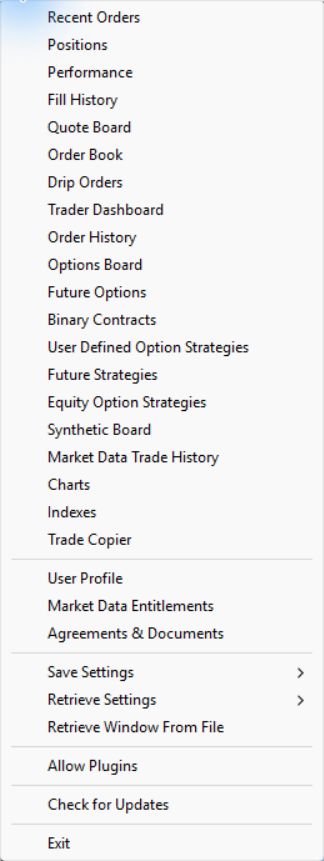
No deliberate disconnect or reconnection was induced for this guide. Use current provider instructions when the visible procedure differs; do not invent a menu item or assume every build behaves identically.
Confirm connection, then account state

Check the following in order:
| Check | What to verify |
|---|---|
| Connection | Intended System/Gateway and required services |
| Account | Correct account selected; expected access restored |
| Positions | Current contract, side and size confirmed through the supported account view |
| Working orders | Actual remaining orders, quantities and statuses |
| History | Acknowledgements, fills, rejects or cancellations for earlier requests |
| Automation | Host/client status and handling of missed or pending signals |
Use Order History and Fill History to investigate an earlier order outcome. If a request was sent before the disconnect, find its recorded outcome before sending another. An acknowledgement and a fill are different events.
Check the protective workflow separately
A working parent order, the creation of its child orders and OCO cancellation are separate functions. Confirm which parts live at the exchange, Rithmic service or local application for your connector. The bracket guide explains these distinctions. Do not infer order survival from a restored green status indicator.
For cloud automation, consult the service's documented handling of an unavailable connection and its own logs. This guide does not establish whether any specific bridge queues, rejects or retries a missed signal.
Common questions
Is File > Reconnect available in every Rithmic application?
No universal command was verified. Sierra Chart documents it; the inspected RTrader Pro File menu did not show it. Follow the current instructions for your application.
Should I resend the order that was pending when the connection dropped?
First confirm its outcome in account/order history or with the provider. Resending an uncertain request can create another order.
Does a restored connection prove my stop is active?
No. Check the actual working order and the associated management route. A service indicator is not the stop's status.
Can I resume alerts as soon as quotes return?
First verify account, order and automation state. Quotes alone do not prove that the other services are ready.