
Preserve the exact platform/service error and verify the intended product, expiry, exchange and input format. An unknown identifier, an unsupported instrument and an expired contract are different possibilities. Do not submit repeated orders to find a working spelling; first use the supported data/symbol lookup and current provider instructions.
Educational software guidance. Trading involves risk. Read the financial and information disclaimers.
A diagnostic sequence
- Record which application generated the message and whether it failed during lookup, data subscription, payload validation or order submission.
- Confirm the intended product, not just a familiar root such as ES.
- Confirm the listed expiry month/year and relevant exchange.
- Check the format accepted by this interface, including a separate exchange field or dotted notation where documented.
- For automation, compare the chart identifier, generator trading symbol and receiver's resolved contract.
- Ask the provider about instrument availability or entitlement when the identifier is correct but access still fails.
Use CME month codes and its contract-code explanation as references. A month letter does not establish that every product lists that expiry.
What was actually verified
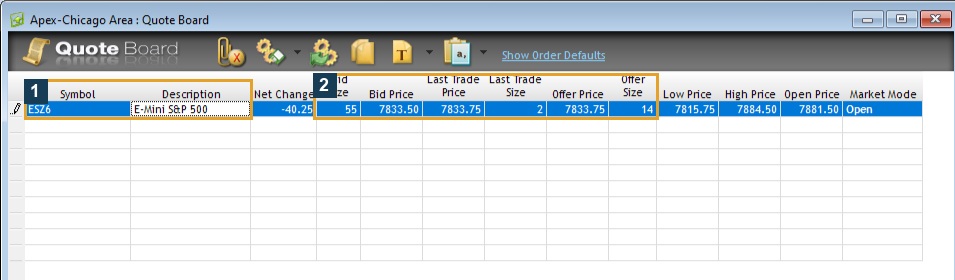
The native Quote Board accepted ESZ6.CME and displayed ESZ6 / E-Mini S&P 500 quotes after leaving the input cell. It demonstrates one valid lookup in desktop 17.106.0.2, Apex / Chicago Area. No deliberately invalid order or error was generated.
| Possible mismatch | Useful check |
|---|---|
| Wrong expiry | Current exchange/product reference |
| Continuous label sent as a specific identifier | Connector/bridge mapping rules |
| Wrong exchange notation | Actual input labels and vendor guide |
| Chart root differs from intended execution product | Generator settings and recorded resolved symbol |
| Correct code, unavailable data | Entitlement and provider support |
Preserve earlier order outcomes
If a request may already have reached the broker, reconcile its acknowledgement/status before sending a replacement. A client display or payload error does not establish every later processing outcome. See Order History.
Common questions
Does every platform show the same invalid-symbol text?
No universal wording was verified. Use the exact observed message instead of a fabricated error catalogue.
Is dotted notation required everywhere?
No. It was observed in the native lookup and documented for specific connectors. Verify each interface.
Does PickMyTrade automatically roll every identifier?
Do not assume that. Its documented mapping/roll rules and existing-position responsibilities are separate; verify the current generated configuration.
Should I place an order to test the symbol?
Start with the supported lookup and provider checks. This guide requires no order simply to obtain evidence.