
A liquidation-only restriction generally permits reductions of existing exposure while preventing new exposure. Identify the exact account state and reason with the provider. The message alone does not prove a daily loss breach or establish when normal trading will resume.
Educational software guidance. Trading involves risk. Read the financial and information disclaimers.
Check the restriction in order
- Preserve the complete response and timestamp privately.
- Verify the System and account used for the rejected request.
- Inspect current positions and working orders; a rejected entry says nothing about an earlier request's result.
- Confirm whether the intended request reduces the position or could open or reverse exposure.
- Ask the provider for the controlling restriction and permitted recovery procedure.
Do not repeatedly send a new entry, change personal risk settings or buy another evaluation merely to test whether the message disappears.
Where to inspect risk information
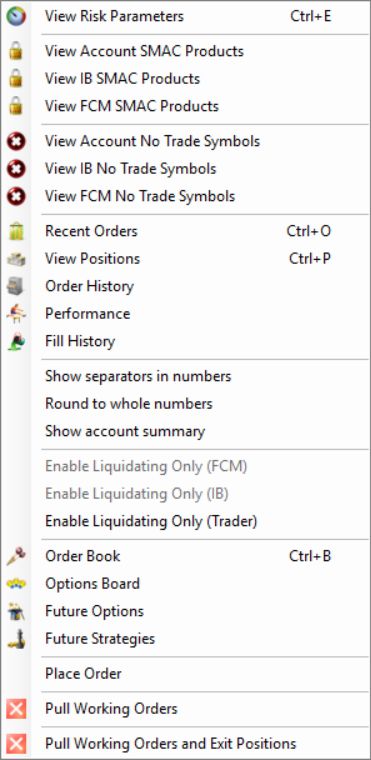
The native account menu showed separate liquidation-only entries for FCM, IB and Trader scopes. The first two were disabled in the inspected menu. No liquidation-only command was selected. These entries demonstrate separate scopes, not authority to remove an existing provider restriction.
Rithmic's risk overview describes distinct normal, liquidation-only and administrator-controlled account states. The provider must confirm which state applies to your account and why.
If an intended exit is rejected
Compare the actual account position, side, quantity and working exits. An oversized closing instruction can create new exposure. If the request should reduce exposure but still fails, preserve the exact response and contact the provider's trading or risk support through its established channel.
What the documented state permits
Rithmic’s current FAQ distinguishes post-liquidation states from a Soft Loss Limit that resets after firing. Liquidate Only permits position-reducing orders; Admin Only is an administrator restriction. Request the exact mode and its authorized clearing procedure. No genuine rejection was present in the inspected session, so the screenshot above identifies the relevant control rather than inventing an error.
Common questions
Will reconnecting clear liquidation-only status?
Not necessarily. A connection refresh does not remove a provider-controlled account restriction.
Does the message mean my evaluation failed?
It does not establish that by itself. Ask the provider to identify the cause and the exact account-stage rule.
Can I still close a position?
That is the intended distinction of liquidation-only access, but each submitted request still needs to reduce the actual exposure and pass applicable checks. Escalate a rejected exit promptly through the provider's support process.
Does it clear at the next session?
Rithmic’s current FAQ says post-liquidation Liquidate Only and Admin Only modes require manual clearing. The provider must identify the account mode and whether restoration is available for its account-stage rules.