
Apex, Bulenox, Leeloo and Earn2Trade publish Rithmic setup routes, and TradeDay announced Rithmic in August 2026. Check the exact account offered today before purchase. Topstep’s current TopstepX route should not be presented as a new Rithmic setup.
Educational software guidance. Trading involves risk. Read the financial and information disclaimers.
Current evidence checked 7 October 2026
| Firm | What the official source establishes | Material qualification |
|---|---|---|
| Apex | Rithmic setup | Use Apex System; separate NinjaTrader eligibility. For an Apex-issued login, check the Apex Rithmic setup and account scope before using a generic connection recipe. |
| Bulenox | Rithmic connection | Paper Trading route; PickMyTrade documentation excludes Bulenox. For Bulenox, check Rithmic setup and tool exclusions before treating broker access as automation compatibility. |
| Leeloo | Required first step | Provider page contains older platform/version examples. For a Leeloo-issued login, check the Leeloo Rithmic instructions and current account eligibility. |
| Earn2Trade | Rithmic evaluation setup | Free NinjaTrader access changed to another route in June 2026. For Earn2Trade, check Rithmic credentials and the supported platform route for the current account stage. |
| TradeDay | August 2026 availability announcement | Actual issued System/permissions still account-specific. For TradeDay, check Rithmic availability and setup scope against the current account offering. |
| Topstep | Current TopstepX offering | Do not sell a historical Rithmic tutorial as its current default. For Topstep, check legacy Rithmic versus current routes before assuming a newly offered account uses Rithmic. |
This is an evidence-backed selection, not an exhaustive directory or recommendation to buy a program.
Compare before choosing
Check the exact plan/stage, account technology, permitted software, fees, drawdown method, quantity limits and holding rules. Treat automation and copying permissions as separate questions. A firm's public connection article does not promise approval for every tool or strategy.
Avoid three common mismatches
Do not assume every platform licence is included with Rithmic access. Do not assume every compatible receiver supports every listed firm. Do not infer live execution or Rithmic 01 from the word funded. Retain the dated official plan/rule documents that apply to the account actually purchased.
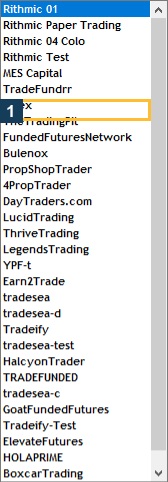
Screenshot references
Common questions
Is this every Rithmic prop firm?
No. It lists firms with checked evidence relevant to these guides.
Does listed mean recommended?
No. Compare the actual program and your requirements.
Does Rithmic support prove copier permission?
No. Technology, account entitlement and firm rules are separate.
Why is Topstep included as a qualification?
Old Rithmic tutorials can misdirect users whose actual platform is TopstepX.