
Earn2Trade’s July 2026 guide sends Rithmic evaluation users separate data-feed credentials and names Rithmic Paper Trading–Chicago Area–Non-Aggregated where a server selection is required. Its free NinjaTrader offering changed to the NinjaTrader–Tradovate route; do not assume a new Rithmic subscription includes a NinjaTrader licence.
Educational software guidance. Trading involves risk. Read the financial and information disclaimers.
Set up the issued Rithmic evaluation
- Verify your Earn2Trade registration email.
- Find the separate Rithmic Data Feed Credentials Created message.
- Use the agreement link in the current evaluation setup guide, and answer classification questions accurately.
- Configure a supported platform using those trading credentials.
- Where required, select the named Rithmic Paper Trading–Chicago Area–Non-Aggregated service. Interface wording can combine the System, region and feed choice.
- Confirm the intended account and current quote timestamps. If credentials remain unavailable, use Earn2Trade's support route rather than guessing another System.
The source covers Trader Career Path and Gauntlet Mini evaluations. Its off-hours provisioning note is not a universal activation-time guarantee.
Understand the June 2026 NinjaTrader change
Earn2Trade's June 5 notice says new free NinjaTrader access uses the NinjaTrader–Tradovate unified API. Legacy provided NinjaTrader/Rithmic access was honored only through June 30, 2026. It gives an exception for a personal NinjaTrader licence with Rithmic integration; confirm the actual entitlement before relying on that route.
Keep stage transitions separate
Passing an evaluation does not prove the same credentials, service or rules continue into another arrangement. Use the newly issued account details and agreement. Recheck account IDs in workspaces, strategies and copier destinations rather than applying a generic funded-equals-Rithmic-01 rule.
Screenshot references
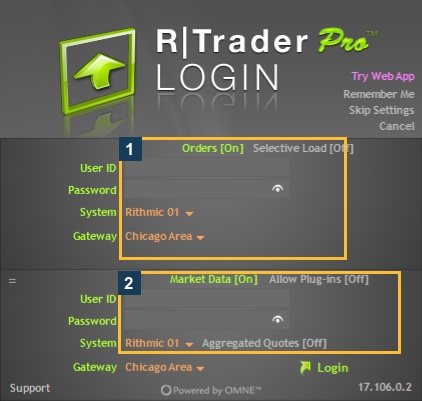

Common questions
Is NinjaTrader still offered free?
Earn2Trade says yes through its updated NinjaTrader–Tradovate option, not the old blanket Rithmic licence route.
Can a personal Rithmic-compatible licence be used?
The notice describes that exception; confirm account-specific eligibility.
Are website credentials the data-feed login?
Use the separate Rithmic credential email.
Does a completed agreement prove order acceptance?
No. Authentication, account visibility, data and order responses are separate.