
Rithmic can enforce configured account limits, but the firm’s agreement defines the program rules. Match the exact account stage and plan. A working connection, visible copier or accepted order does not prove a strategy complies with that agreement.
Educational software guidance. Trading involves risk. Read the financial and information disclaimers.
Build an account-specific rule sheet
| Rule | Record precisely |
|---|---|
| Loss / drawdown | Amount, equity reference, intraday/EOD update, enforcement timing and threshold behavior |
| Position size | Instrument limits, pending-order treatment and micro-equivalence policy |
| Holding | Daily cutoff, timezone, news/weekend and delivery restrictions |
| Copying / automation | Ownership, allowed tools, leader/follower arrangement and account-stage restrictions |
| Program progression | Scaling, consistency, minimum days and payout eligibility |
| Fees | Current subscription, reset/activation, data and tool charges |
Inspect the configured risk without changing it
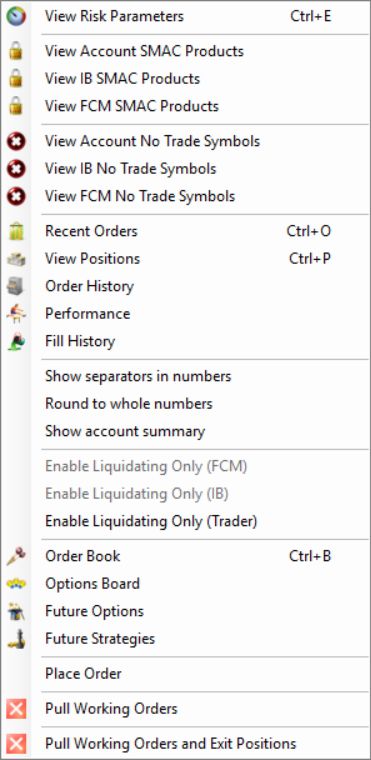
The native account context menu exposes View Risk Parameters and the risk window distinguishes FCM/IB/Trader controls. Use the provider-enforced values as account evidence while checking the agreement's calculation and timing. Do not assume every visible field is editable or override a provider limit.
Resolve apparent policy conflicts
Apex's current user agreement imposes ownership and other conditions on copying. Its separately labeled legacy PA help contains additional restrictive language. Do not flatten these into a universal yes/no statement for every plan or account generation. Keep the applicable agreement and request written clarification from the firm when the proposed workflow is unclear.
Rithmic risk documentation explains technical criteria; it cannot establish payout permission or the firm's interpretation of a trading method. Likewise, a third-party vendor's compatibility page cannot waive firm restrictions.
Recheck after changes
Review the rule sheet after a reset, stage transition, plan change or provider notice. Record the source date and actual account ID privately. A historical comparison table is useful context only when each cell still matches the current account terms.
Screenshot references

Common questions
Does an accepted order prove compliance?
No. Some program conditions are evaluated separately from order-entry checks.
Is a visible copier permission to use it?
No. Confirm entitlement and the applicable account agreement.
Are micros always counted at 10:1?
Not necessarily. Use the firm’s explicit contract-count rule.
Can I edit FCM limits myself?
Do not assume permission or attempt to bypass provider-enforced limits.