Prop firms

Bulenox Rithmic Setup and Compatibility Checks

Quick answer

Bulenox’s connection instructions specify the User ID/password from its Member’s Area, Rithmic Paper Trading and the Chicago gateway, with Market Data and Allow Plugins on. This does not mean every third-party Rithmic receiver supports Bulenox.

Educational software guidance. Trading involves risk. Read the financial and information disclaimers.

Follow the current Bulenox connection recipe

  1. Open Bulenox's Connection help page and expand Rithmic Connection.
  2. Obtain the trading credentials from the Member's Area and install the supported RTrader Pro build.
  3. Enter the issued User ID/password and select Rithmic Paper Trading.
  4. Use the documented Chicago gateway or a provider-supported alternative appropriate to the connection.
  5. Set Market Data: On and Allow Plugins: On for this documented recipe.
  6. Read the required agreements and select the subscriber classification that actually applies.
  7. Match the expected account and inspect data entitlement before enabling another client.

Understand what is included

The current Bulenox article describes non-professional exchange data as included with its Qualification Account. Do not extend that statement to every stage, classification or add-on. Obtain the current invoice/terms for other arrangements rather than using a general CME schedule as the retail quote.

PickMyTrade is a material exception

PickMyTrade's Rithmic setup documentation excludes Bulenox from that route. Rithmic connectivity in RTrader does not remove this exclusion. Do not purchase or configure the receiver on the assumption that every Rithmic firm is supported.

If another platform fails

Confirm its current licence/connection eligibility, whether it uses the running Pro host, and matching server settings. Preserve the exact error. An active RTrader session cannot prove a separate API route is authorized. Public native references below do not show a Bulenox account authenticated locally.

Screenshot references
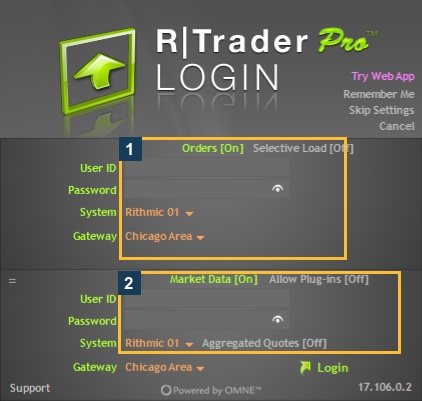
Actual empty native RTrader login controls. This image does not contain or authenticate another firm’s credentials.
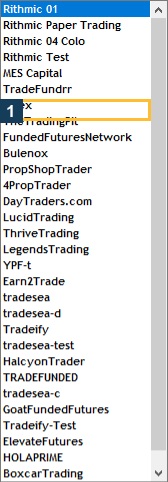
Actual available System labels in this build. A listed System does not establish account entitlement.

Common questions

Where do I get the trading credentials?

Bulenox directs users to the Member’s Area.

Does this route use Rithmic 01?

The cited setup specifies Rithmic Paper Trading.

Can I assume PickMyTrade supports it?

No. Its current Rithmic setup documentation excludes Bulenox.

Does data inclusion apply to every account?

Use the terms for the exact program, stage and subscriber classification.

Financial and information disclaimers

Financial disclaimer

These guides explain software and workflows. They are for education, not financial, investment, tax, or legal advice. No example is a suggestion to buy or sell a product or use a trading strategy. Trading futures involves substantial risk and can lose money, including all funds you put at risk. Leverage can cause losses that exceed your starting funds. Automation can fail, send duplicate orders, or act late. Stop orders do not guarantee execution or a specific exit price; their behaviour depends on the order type and applicable exchange rules. Review your orders and positions, and consult a qualified professional for your own situation. Paper trades, examples, and past results do not predict live results or promise a profit.

Information disclaimer

This is general help based on the sources and check date shown on each page. Screens, settings, fees, data access, server names, error wording, menu paths, and product support can change or differ by app version, account, country, broker, prop firm, and FCM. The content may contain errors or become out of date; accuracy, completeness, and continuous service are not guaranteed. Check current Rithmic, broker, prop firm, and platform instructions before acting. Screenshots show where controls are located; they do not prove that an order test passed. These guides do not replace broker terms or risk notices. References to Rithmic, RTrader Pro, CME Group, NinjaTrader, Tradovate, TradingView, Apex, Topstep, TradeDay, Leeloo, Bulenox, Earn2Trade and other brands identify their products and do not imply any endorsement of this guide.

Documentation only. Live trading workflows are not certified or execution-tested.

Automate TradingView alerts to Rithmic

See the Rithmic integration