
Leeloo’s published first-step guide specifies its issued trading credentials, Rithmic Paper Trading and Chicago Area—not Rithmic 01. Select the documented market-data route for using RTrader alone, monitoring beside another platform, or sharing a plugin host.
Educational software guidance. Trading involves risk. Read the financial and information disclaimers.
Start with Leeloo's issued details
Use the credentials in the Welcome to Leeloo message, not the password created for website registration. Leeloo's first-step guide requests its linked Pro installer/template. The public page contains older version examples; use its current download and provider support rather than copying those old numbers.
Choose the connection scenario
| Intended use | Leeloo's documented approach |
|---|---|
| RTrader Pro for trading and data | Paper Trading / Chicago Area, Market Data on, matching details in the data section |
| RTrader monitoring beside a direct data platform | Market Data off in RTrader for the documented monitoring arrangement |
| Several compatible clients | Follow the supported Pro plugin route and client-specific instructions |
Read the required agreements and certify the actual subscriber classification. Then compare the account in Leeloo's dashboard view with the issued account record.
Check depth before troubleshooting Bookmap or Jigsaw
The Leeloo guide describes Level 1 and one Rithmic connection as its defaults. Depth-dependent software can require a separately authorized Level 2 subscription. Current account terms can differ, so verify the actual entitlement and charges before purchase.
Separate old platform examples from current eligibility
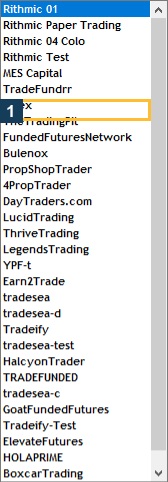
The page was last modified in 2024 and contains historical compatibility/version text. Use current platform documentation for Sierra, NinjaTrader and other clients. A legacy vendor list does not override current onboarding restrictions. The native screenshots below show the relevant RTrader controls in this library's Apex session, not a Leeloo login.
Screenshot references

Common questions
Which System does the cited Leeloo guide name?
Rithmic Paper Trading.
Does default Level 1 prove depth access?
No. Check Level 2 entitlement for a depth-dependent client.
Should I enter Leeloo website credentials?
Use the separately issued trading credentials.
Can I use old installer version examples literally?
No. The source contains dated examples; follow the current supported download and client guidance.