
TradeDay announced Rithmic availability on August 10, 2026. For an account actually assigned to Rithmic, use the trading credentials, System and platform instructions issued by TradeDay. The launch announcement does not supply a universal evaluation/funded server table.
Educational software guidance. Trading involves risk. Read the financial and information disclaimers.
Confirm the selected account route
Read TradeDay's Rithmic launch announcement, then check your actual account details. Availability at the firm level does not mean a previously issued account changed providers automatically.
Assemble the setup details
| Required detail | Use |
|---|---|
| Rithmic username/password | Trading authentication, distinct from website access |
| Exact System and Gateway | Connection selection supplied for that account |
| Supported platform and edition | Determines the client recipe and licence |
| Agreement/data status | Establishes prerequisites for exchange access |
| Program stage and current rules | Determines holding, risk and permitted-tool constraints |
Connect after receiving the assignment
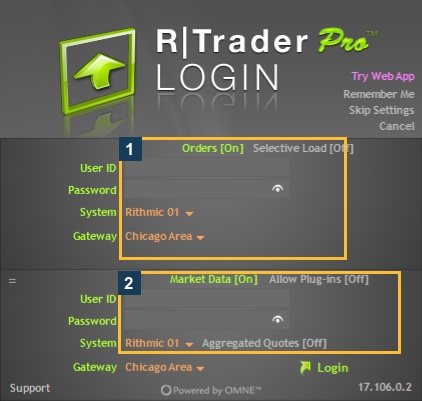
Install the provider-supported RTrader Pro build. Enter the issued details and use the assigned System rather than guessing Rithmic Paper Trading or Rithmic 01. Read any required agreements and classify yourself accurately. Then inspect Trader Dashboard for the intended account and check exchange access separately from authentication.
If using a plugin client, match its settings with the Pro host and keep the host running. If using a direct client, verify its session allowance and eligibility. Use the platform-specific guides for exact client labels.
If the issued information is incomplete
Ask TradeDay's official support channel to confirm the account's data/order route, System, Gateway and supported platform. Retain the account type and error timestamp privately. No TradeDay credentials or dashboard were accessed for this library; the references show generic native controls from the existing VPS session.
Do not infer copier/automation permission, drawdown method or API eligibility from the availability announcement. Those require the current account agreement and the selected tool's compatibility.
Screenshot references
Common questions
Was Rithmic available in old TradeDay tutorials?
The dated August 2026 launch supersedes older availability assumptions.
Should every evaluation select Paper Trading?
Use the actual TradeDay-issued System; the announcement does not establish a universal value.
Does passing guarantee new live Rithmic credentials?
Follow the actual next-stage agreement and issued details.
Does connectivity establish PickMyTrade eligibility?
No. Confirm both the receiving service route and firm permission.