
Prop firms

Rithmic Prop Accounts: Evaluation, Simulated Funded and Live

Quick answer

A program label such as evaluation, PA or funded does not by itself identify live execution, the Rithmic System or available capital. Read the actual account agreement, then match the issued trading credentials and account ID to that stage.

Educational software guidance. Trading involves risk. Read the financial and information disclaimers.

Separate three questions

Question Evidence needed
What program stage is this? Provider account record and current stage agreement
Are orders simulated or live? Explicit provider execution/account description
Which connection should be used? Issued platform, Rithmic System/Gateway and credentials

Live market prices can be displayed in a simulated environment. A simulated funded program can have payout rules without making its advertised account size a cash deposit or its orders live exchange executions.

Compare provider-specific examples

Apex's Rithmic setup names its Apex System. Earn2Trade's evaluation setup names a Paper Trading Chicago service. Neither supports a universal rule that every evaluation uses Paper Trading and every funded account uses Rithmic 01.

Recheck after a transition or reset

Record whether the account ID, login, System, fees, trading hours, loss criteria or tool permissions changed. Update saved order destinations, strategies and copier relationships deliberately. Keep the previous account's orders and state separate; selecting a new account does not clear the old one.

Avoid comparing only headline account size. Examine the actual drawdown allowance and its calculation, contract limits, permitted products, subscription/activation costs and payout conditions. Use dated provider rules rather than a generic fee range or stale firm matrix.

Screenshot references
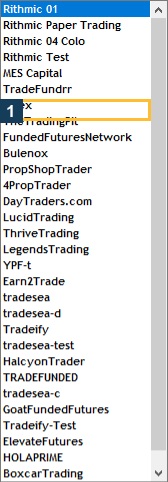
Actual available System labels in this build. A listed System does not establish account entitlement.
Actual VPS account-dashboard fields, with identities and balances concealed. This is the inspected Apex session, not another firm’s account.

Common questions

Does funded always mean live exchange execution?

No. Read the provider’s explicit stage description.

Does a live quote prove a live order?

No. Data and execution environment are different.

Are PA rules identical at every firm?

No. The label and rules are provider-specific.

Can a reset change an ID?

It can. Compare newly issued details rather than assuming continuity.

Financial and information disclaimers

Financial disclaimer

These guides explain software and workflows. They are for education, not financial, investment, tax, or legal advice. No example is a suggestion to buy or sell a product or use a trading strategy. Trading futures involves substantial risk and can lose money, including all funds you put at risk. Leverage can cause losses that exceed your starting funds. Automation can fail, send duplicate orders, or act late. Stop orders do not guarantee execution or a specific exit price; their behaviour depends on the order type and applicable exchange rules. Review your orders and positions, and consult a qualified professional for your own situation. Paper trades, examples, and past results do not predict live results or promise a profit.

Information disclaimer

This is general help based on the sources and check date shown on each page. Screens, settings, fees, data access, server names, error wording, menu paths, and product support can change or differ by app version, account, country, broker, prop firm, and FCM. The content may contain errors or become out of date; accuracy, completeness, and continuous service are not guaranteed. Check current Rithmic, broker, prop firm, and platform instructions before acting. Screenshots show where controls are located; they do not prove that an order test passed. These guides do not replace broker terms or risk notices. References to Rithmic, RTrader Pro, CME Group, NinjaTrader, Tradovate, TradingView, Apex, Topstep, TradeDay, Leeloo, Bulenox, Earn2Trade and other brands identify their products and do not imply any endorsement of this guide.

Documentation only. Live trading workflows are not certified or execution-tested.

Automate TradingView alerts to Rithmic

See the Rithmic integration
