
An order type defines when an order becomes eligible for execution and what price conditions apply. Market, limit and stop orders serve different purposes. Brackets, OCO arrangements and trailing stops add instructions for managing orders. Availability and behavior depend on the trading platform, connection, broker and exchange.
Educational software guidance. Trading involves risk. Read the financial and information disclaimers.
Market orders
A market order prioritizes execution without specifying a limit price. The price displayed when an order is submitted may differ from the eventual fill.
CME distinguishes market-limit orders from market orders with protection. The exchange's protection range can restrict execution at extreme prices. A platform label alone does not describe every applicable exchange rule. See CME's explanation of futures order types.
Example. A trader submits an order to buy one ES contract while the displayed offer is 5250.00. The order response and execution report establish whether it was accepted and where it filled. The displayed offer is not a promised execution price.
Key limitation. Liquidity, market conditions and the applicable order rules affect execution. Submission does not establish a complete fill.
Limit orders
A buy limit specifies the highest acceptable purchase price. A sell limit specifies the lowest acceptable sale price. An execution may occur at the limit or at a more favorable price.
Example. A buy limit at 5245.00 permits a purchase at 5245.00 or below. It does not require the market to provide a fill.
Key limitation. Reaching the limit price does not ensure that the entire order executes. Queue position and available quantity matter. NinjaTrader's order-type reference also distinguishes partial fills from complete execution.
Stop orders
A stop introduces a trigger condition. The instructions that become active after that condition is met depend on the order type.
NinjaTrader describes stop-market orders as becoming market orders when triggered. CME documents a stop-with-protection mechanism with a defined execution range. Confirm the mapping used by the specific connection.
Example. For an illustrative long entry at 5250.00, a sell stop at 5245.00 places the trigger five points below entry. That distance is not a maximum possible loss. The eventual execution may differ from the trigger price.
Stop-limit orders
A stop-limit combines a trigger with a limit price. Once activated, the limit controls the acceptable execution price.
Example. A sell stop-limit has a trigger of 5245.00 and a limit of 5244.00. After activation, a fill must satisfy the sell limit. If the market moves below that price without sufficient eligible buying interest, the order can remain unfilled.
Key limitation. Price control can leave a position open. A stop-limit does not guarantee an exit during a sharp move.
Bracket orders
A bracket associates an entry with intended exit orders, commonly a stop and a profit target. The platform determines when those exits are submitted and how their quantities are managed.
For an illustrative entry at 5250.00, a bracket might specify a stop at 5240.00 and a target at 5270.00. These prices describe the configuration, not a recommended trade or a completed result.
After the entry fills, inspect each exit's accepted quantity, price and status. Do not infer that both exits are working simply because a bracket setting was enabled.
Read the bracket-order guide for the observed desktop/web controls and platform-specific dependencies.
OCO arrangements
One-cancels-other, or OCO, links orders through a cancellation instruction. In a typical exit arrangement, execution of one order prompts cancellation of its partner.
A cancellation request and a confirmed cancellation are separate events. Partial fills, timing and the location of the managing software can affect the outcome. Confirm the remaining orders and position after either exit executes.
A bracket includes an entry and associated exits. OCO describes the relationship between linked orders. See the OCO guide for platform-specific considerations.
Trailing stops
A trailing stop adjusts its trigger as the reference price moves favorably. In a simple fixed-distance arrangement, the trigger does not move back when the market reverses. Actual behavior depends on the platform's activation, reference-price and adjustment settings.
Illustrative long-position example
Assume an ES entry at 5250.00 and a trailing distance of 10 points. The table assumes the trailing mechanism is active and each adjustment is accepted.
| Market event | Illustrative stop level | Interpretation |
|---|---|---|
| Entry at 5250.00 | 5240.00 | The initial trigger is 10 points below entry. |
| Reference price rises to 5260.00 | 5250.00 | The trigger reaches the entry price, before costs. |
| Reference price rises to 5280.00 | 5270.00 | The trigger advances while maintaining the assumed distance. |
| Reference price returns to 5270.00 | 5270.00 | The stop may activate under the configured trigger rules. |
The final row does not establish an execution at 5270.00. Realized profit or loss depends on the actual fill, quantity and trading costs.
Benefits. A trailing mechanism can update the stop without repeated manual adjustments.
Limitations. A normal price retracement may activate the stop. Continued adjustment may also depend on local software remaining connected. NinjaTrader's trailing-stop documentation illustrates why activation and update rules must be checked for the specific implementation.
Read the trailing-stop guide for interface references and platform considerations.
Market-if-touched orders
A market-if-touched, or MIT, instruction activates a market order when its specified trigger condition is met. For example, a buy MIT may use a trigger below the current market price.
An MIT trigger does not set a maximum purchase price. This differs from a buy limit, which defines the highest acceptable execution price.
NinjaTrader documents MIT methods, but that documentation alone does not establish availability through every Rithmic connection. Confirm support with the platform and account provider before relying on this order type.
Comparison of order instructions
| Instruction | Main purpose | Principal limitation |
|---|---|---|
| Market | Request execution without a specified limit price | The fill price and complete execution are uncertain. |
| Limit | Set an acceptable execution price | The order may remain unfilled or fill partially. |
| Stop | Activate an order when a trigger condition is met | A trigger is not a guaranteed execution price. |
| Stop-limit | Combine activation with a limit price | The limit can prevent an exit. |
| Bracket | Associate an entry with intended exits | Each exit requires its own accepted state. |
| OCO | Link orders through cancellation logic | Cancellation must be confirmed. |
| Trailing stop | Adjust a stop according to configured rules | Updates depend on the implementation and connection. |
| MIT | Activate a market order at a specified trigger | Trigger price does not control fill price. |
Observed web interface
In the inspected R Trader Pro Web session, the second panel under the instrument gear displayed Qty, Cancel After (Sec) and Cancel At. Quantity was set to 1 and both timer switches were off.
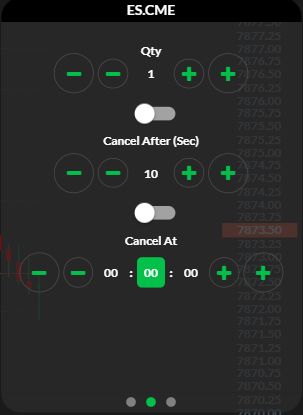
The image records visible controls. Timer execution, timezone interpretation and order expiry were not tested. The desktop duration menu is documented separately below.
Observed desktop duration controls
In desktop Order Book, select Order Defaults, then Duration. The inspected menu listed DAY, GTC, IOC and FOK. Availability in this menu is not a guarantee of acceptance for every exchange or account.
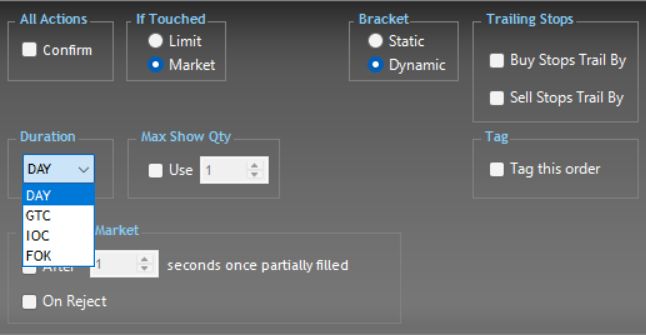
Documented platform differences
| Platform / connection | What the current vendor documentation establishes |
|---|---|
| NinjaTrader 8 / Rithmic | Accepted or working orders are held remotely; OCO management is local to the PC. |
| Sierra Chart / Rithmic Direct | Server-managed OCO is supported; server-managed bracket orders are not supported as of the vendor's current writing. |
| R Trader Pro desktop | The native interface references establish control locations, not a completed execution or disconnect test. |
Sources checked 7 October 2026: NinjaTrader's Rithmic-specific order-location section and Sierra Chart's service capabilities. A server-held stop and the software that creates, trails or cancels its companion are different parts of the workflow.
For the execution-versus-price trade-off, compare market and limit order conditions before selecting an instruction.
Common questions
Does a stop guarantee that a loss stays within the chosen distance?
No. The stop defines a trigger and subsequent order instructions. A price gap, execution restriction or different fill price can produce a larger loss.
Can a working order be modified?
Supported changes depend on the order and platform. A modification request can arrive after a fill or be rejected. Check the acknowledgement and current order state before relying on the change.
What if both OCO orders fill?
Reconcile the executions and current position immediately. Do not assume a cancellation succeeded or that a subsequent action has removed the exposure.
How do DAY and GTC instructions differ?
DAY generally applies to the current trading session. GTC is intended to remain working beyond that session until another termination condition applies. Confirm the broker's session, expiry and cancellation rules for the account.
How should automated stop and target instructions be configured?
Use the current generated message and documented exit mode for the selected connection. Confirm each resulting order separately. The Rithmic JSON guide explains the distinction between message validation and execution evidence.