
A depth-of-market display shows visible resting bid and ask quantities by price. A price ladder alone does not prove depth access. Check the exchange entitlement, the selected dated contract and the platform configuration before diagnosing a blank book.
Educational software guidance. Trading involves risk. Read the financial and information disclaimers.
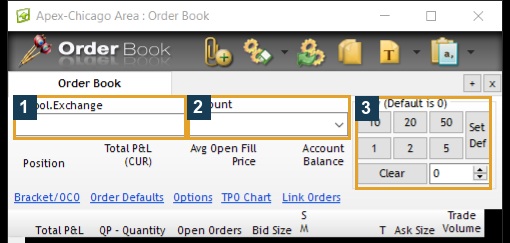
Open the observed desktop Order Book
In R Trader Pro 17.106.0.2, use File → Order Book and resolve the instrument. The inspected ES Order Book exposed the ladder and order controls. Opening the window is a read-only inspection; clicking a price or trading button can send an order, depending on its configured behavior.
Read the information correctly
| Information | Meaning |
|---|---|
| Price row | A price increment in the selected instrument |
| Bid / ask quantity | Displayed resting buying / selling interest at that level |
| Last trade | Executed activity, different from resting interest |
| Volume | Executed quantity over the display's specified interval |
| Own orders | Your orders, which require their own server states |
Orders can be added or cancelled without trading. Displayed size is not a guarantee of future liquidity or a prediction of direction.
Top of book, depth and market by order
Rithmic's FAQ distinguishes top-of-book and depth access. Bookmap's connection documentation describes its Rithmic MBO support. MBO identifies individual displayed orders; market-by-price aggregates quantity at a level. Neither implies that every provider subscription enables the same data.
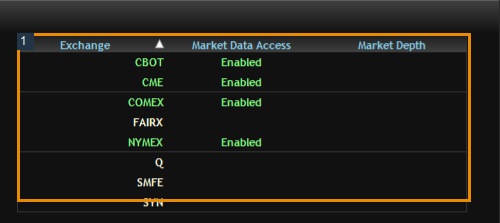
The native File → Market Data Entitlements panel below shows enabled data access but blank Market Depth cells. That session therefore does not establish a full-depth entitlement. Do not infer five, ten or unlimited levels merely from the word Rithmic.
Diagnose a blank ladder
Check whether the contract's session is open, its quote timestamps change, and the exchange is enabled. Then compare the subscription's depth permission with the platform connection settings. If top-of-book works but depth does not, ask the provider to check depth entitlement before reinstalling software. Preserve the contract, time, platform version and precise missing columns.
Screenshot references
Common questions
Is every ladder a full order book?
No. A ladder can show price rows with only top-of-book data or no depth subscription.
Does a large bid guarantee support?
No. Displayed orders can change or cancel.
Do all platforms use the same click actions?
No. Learn the selected platform configuration in permitted simulation before using order-entry cells.
Can an API use depth data?
A supported API and entitlement can provide depth. A visual DOM and a TradingView webhook are different interfaces.