
A market order requests execution without a specified limit price. A limit order sets the highest purchase price or lowest sale price you will accept. Neither submission nor a displayed quote proves a fill. Choose the instruction according to the price restriction and execution conditions you need, then inspect the response.
Educational software guidance. Trading involves risk. Read the financial and information disclaimers.
Compare the instructions
| Question | Market | Limit |
|---|---|---|
| Is a limit price specified? | No | Yes |
| Can the whole quantity remain unfilled? | Yes, depending on acceptance and execution conditions | Yes |
| Can it fill in parts? | Yes | Yes |
| What price evidence matters? | Actual execution reports | Executions must satisfy the applicable limit |
| What must be checked after submission? | Acceptance, fills and remaining quantity | Acceptance, fills and remaining working quantity |
CME's order-type guide distinguishes market-limit orders and market orders with protection. Confirm how your platform maps its label to the exchange instruction. Do not describe every market order as an immediate, unrestricted fill.
An illustrative buy example
Assume a displayed offer of 5250.00. A market request does not promise that price; the available market may change before execution. A buy limit of 5250.00 restricts acceptable purchases to that level or below, but may remain partly or completely unfilled.
A limit above the current offer can be immediately executable. A limit is therefore not necessarily a resting order. Likewise, a price touching a resting limit does not establish that your order received an allocation. NinjaTrader's order reference explains the distinction between order instructions and their fills.
Check duration separately
Order type and duration answer different questions. Type defines price and trigger conditions; duration controls how long or under what immediate-execution condition the order remains eligible.
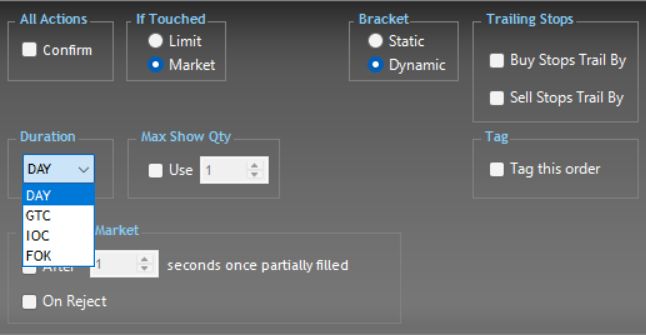
In the inspected R Trader Pro desktop Order Book, Order Defaults exposed Duration with DAY, GTC, IOC and FOK. Seeing a choice does not establish its acceptance for every product or route.
Measure slippage consistently
Slippage compares an actual fill with a defined reference. Record whether the reference is the signal price, bid, offer or another timestamped quote. For a buy, a higher execution price than the reference is adverse; for a sell, a lower price is adverse. Use filled quantity to calculate a weighted average if several executions occur.
Do not use a generic table of typical ticks as a forecast. Contract, quantity, time, available liquidity and order instruction all matter. No measured slippage distribution was established in this review.
Before resubmitting an unfilled order
- Confirm its latest state and remaining quantity.
- Check whether a cancellation or modification is still pending.
- Reconcile fills and the current position.
- Submit another instruction only after resolving the first request's outcome.
An unfilled limit is not automatically an error, and repeated market requests can create unwanted exposure. An automation tool's HTTP acknowledgement is not an exchange fill.
Common questions
Does a limit order have no slippage?
A fill should respect its limit, but it can still differ from an earlier signal or benchmark price. State the benchmark when discussing slippage.
Is a stop-limit the same as a limit order?
A stop-limit first requires its trigger condition, then applies its limit. It can remain unfilled after activation.
Does PickMyTrade always send market orders?
Do not assume a universal default. Use the current generated message and documented order mode for the selected connection, then inspect the broker response.
Which type is best for every trade?
There is no universal choice. A price restriction and an execution request involve different trade-offs; neither removes execution risk.