
Use the supported exit workflow for your platform and confirm that the intended orders are actually accepted. The inspected R Trader Pro Web bracket panel exposes target and stop distances in ticks. That establishes the controls, not a guarantee that exits will be placed, linked or filled for every configuration.
Educational software guidance. Trading involves risk. Read the financial and information disclaimers.
Before configuring exits
Record the account, contract, quantity, entry method, exit order types, units and time-in-force. Separate a trigger price from a guaranteed execution price. Do not use a generic number of ticks from a tutorial as a risk recommendation.
Find the observed web settings
- Open the instrument in R Trader Pro Web.
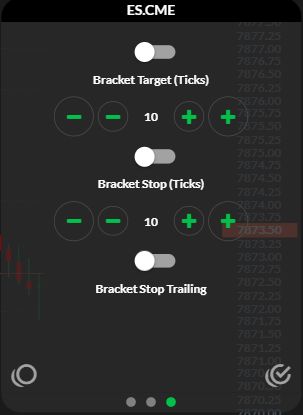
- Open the gear near the upper-left navigation menu.
- Select the third settings-panel dot.
- Locate Bracket Target (Ticks), Bracket Stop (Ticks) and Bracket Stop Trailing.
The captured values of 10 and disabled switches are simply the state observed. No settings were changed and no orders were sent. Use the bracket guide for the evidence still needed to verify execution.
Match exits to the actual position
| Check | Example of a mismatch to investigate |
|---|---|
| Account and contract | Exit points at another account or expiry |
| Quantity | Remaining stop is larger than the remaining position |
| Side | Exit direction would increase rather than reduce exposure |
| Price units | A price was interpreted as a distance, or vice versa |
| Order state | Rejected or pending request mistaken for a working exit |
| Linkage | An independent order mistaken for an OCO companion |
These are inspection questions, not a recipe to place independent orders and link them afterwards. Use only a documented arrangement and verify its responses.
TradingView automation requires a separate configuration
With PickMyTrade, distinguish exits requested by later strategy alerts from attached exits. Do not combine settings merely because the fields have similar names. Generate the payload for the selected Rithmic route and use the JSON checks. Exact stop/target units and behavior need to match the chosen mode.
After an exit or connection failure
Inspect the position and every remaining order. Do not assume the unused target or stop disappeared. The OCO guide explains why the order's location and its cancellation logic can differ. Preserve the relevant response and timestamp before troubleshooting.
Captured reference
Find the desktop bracket configuration
- Open File, then Order Book.
- Select Bracket/OCO.
- Select Config in the Brackets area.
- Inspect Target Only, Stop Only or Both, then the target/stop tick distances and quantities.
- Expand Show more options to locate stop-type, trailing and break-even controls.
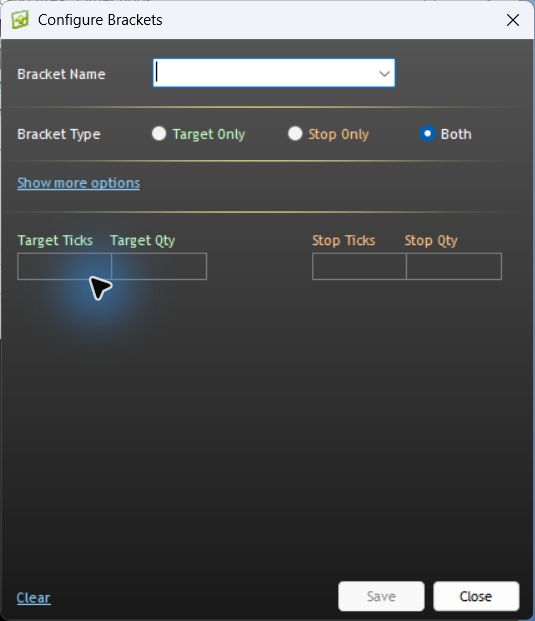
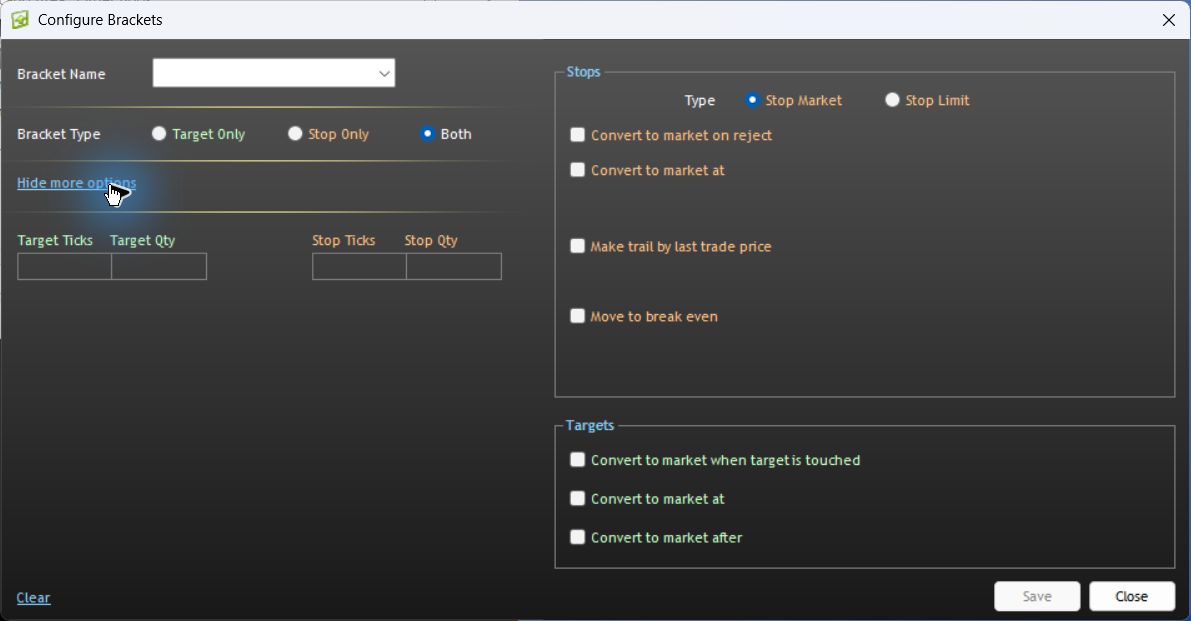
Observed in desktop version 17.106.0.2, Apex/Chicago Area, 7 October 2026. No template was saved and no order was submitted. These controls do not establish that protective orders are working.
Documented platform differences
| Platform / connection | What the current vendor documentation establishes |
|---|---|
| NinjaTrader 8 / Rithmic | Accepted or working orders are held remotely; OCO management is local to the PC. |
| Sierra Chart / Rithmic Direct | Server-managed OCO is supported; server-managed bracket orders are not supported as of the vendor's current writing. |
| R Trader Pro desktop | The native interface references establish control locations, not a completed execution or disconnect test. |
Sources checked 7 October 2026: NinjaTrader's Rithmic-specific order-location section and Sierra Chart's service capabilities. A server-held stop and the software that creates, trails or cancels its companion are different parts of the workflow.
Common questions
Do stop orders cap the loss at the selected price?
No guaranteed fill or loss cap is established. Check the stop type and its execution conditions.
Does changing the settings panel modify an existing order?
Do not assume so. A default setting and an acknowledged order modification are different actions; inspect the actual order response.
Must every platform use the web panel's tick units?
No. The observed labels apply to that web panel. Other platforms and payload modes require their own unit checks.
Is this an end-to-end test of exits?
No. It is a guide to observed controls and verification requirements. Account-specific execution behavior should be established in a provider-permitted simulation before relying on it.