
A trailing stop adjusts a stop level using a configured price reference and distance. In R Trader Pro desktop, open Order Book, select Bracket/OCO, choose Config, then expand Show more options. The inspected bracket dialog includes Make Trail By Last Trade Price. This is a configuration control; it does not prove that a stop is working.
Educational software guidance. Trading involves risk. Read the financial and information disclaimers.
Find the desktop controls
- Open File, then Order Book in R Trader Pro.
- Confirm the instrument and account before configuring any order.
- Select Bracket/OCO, then Config in the Brackets area.
- Review the bracket components, target and stop distances, and their quantities.
- Expand Show more options. Locate the stop type, Make Trail By Last Trade Price and Move To Break Even.
- Check the applicable platform instructions before enabling, saving or using a template. A saved template is not an accepted exit order.
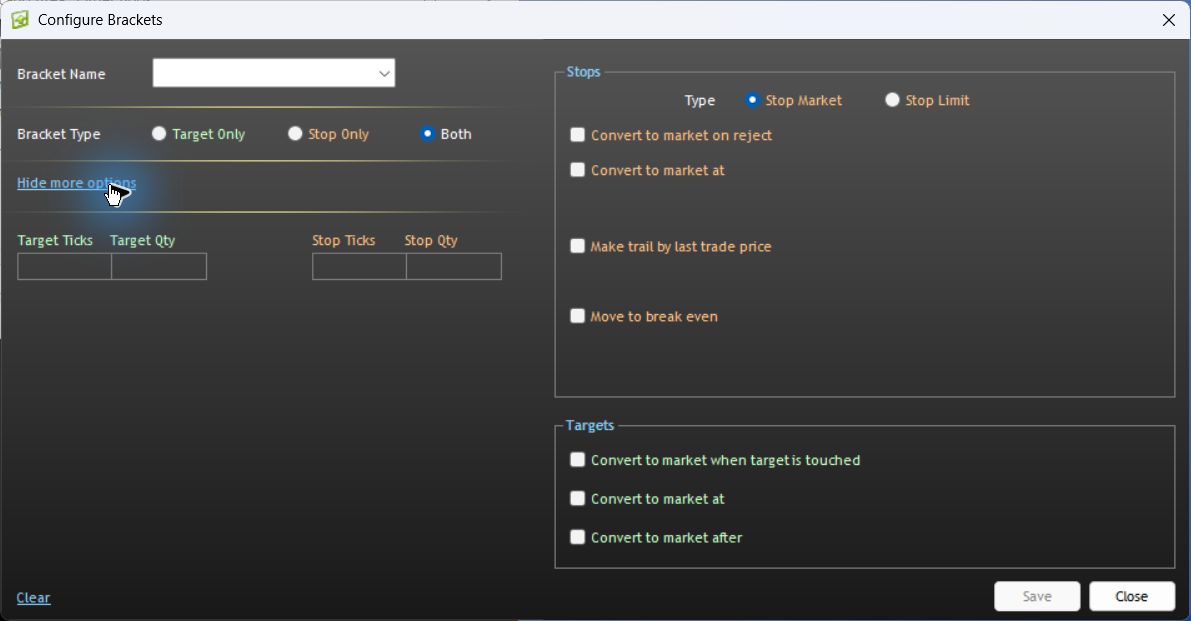
The separate Order Defaults popup also contains Buy Stops Trail By and Sell Stops Trail By. Do not combine separate mechanisms without understanding which one will manage the stop. The inspection did not enable these options or determine their interaction.
How does the distance affect the trigger?
Consider an illustrative long entry at 5250.00 with a fixed trailing distance of 10 points. The example assumes trailing is active and every adjustment is accepted.
| Reference-price event | Illustrative stop trigger |
|---|---|
| Entry at 5250.00 | 5240.00 |
| Reference rises to 5260.00 | 5250.00 |
| Reference rises to 5280.00 | 5270.00 |
| Reference falls to 5275.00 | Remains 5270.00 under the assumed rule |
Activation at 5270.00 would not guarantee an execution at that price. A stop-limit can remain unfilled; a market-style stop follows the execution conditions of its route. Tick distances must be converted using the specific contract's tick size. No trail distance is universally suitable.
Desktop, web and NinjaTrader are different implementations
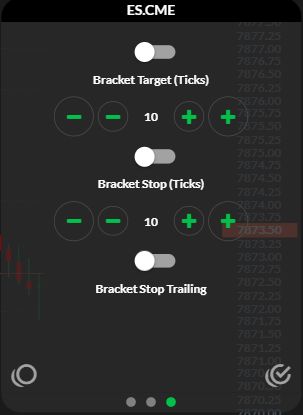
In the observed web app, the third instrument-settings panel has Bracket Stop (Ticks) and Bracket Stop Trailing. Rithmic's web and mobile product page describes server-side brackets with trailing support. That product statement must not be transferred to every third-party connector.
For NinjaTrader ATM templates, Auto Trail documentation separates the stop offset, profit trigger and adjustment frequency. These determine when a trail starts and how it advances. Consult the platform's connection-specific order-location documentation for hosting; a local algorithm and an accepted remote stop can have different dependencies.
If the stop does not move as expected
- Check whether the trailing feature is enabled for this order, rather than only stored in another template.
- Check whether its activation threshold has been reached using the configured reference price.
- Compare the current accepted stop price with the requested adjustment and any rejection response.
- Check whether another strategy or manual action is managing the same stop.
- After a connection interruption, reconcile the position and working exit orders before restarting automation.
Record timestamps, version, route, units and order responses for support. Do not deliberately disconnect a live position to investigate hosting.
Evidence boundary
Desktop version 17.106.0.2 was inspected in an authenticated Apex/Chicago Area session on 7 October 2026. The controls and navigation were verified without submitting an order. Active trailing movement, partial fills and disconnect behaviour were not tested.
Additional interface references
These earlier captures provide interface context only; they are not completed-order evidence.
Common questions
Does a trailing stop guarantee a profit?
No. A trigger above the entry price is not proof of a profitable fill after slippage and costs.
Is trailing the same as moving to break-even?
No. Break-even logic moves a stop to a level related to the entry under a defined trigger. Trailing can continue adjusting it as its reference price changes.
Will trailing continue when I close the platform?
That depends on where the managing logic runs. Check the exact platform and connection; an accepted order and future modifications are separate matters.
Does a trailing stop expire during the daily break?
Inspect its duration and the exchange's session rules. There is no single expiry time that applies to every futures contract or platform.