
Start with the provider that issued your Rithmic account. Obtain its trading credentials, assigned System and supported platform instructions. Verify login, account visibility and market data separately, then understand the intended order and exit workflow. Do not buy an evaluation, copier or VPS solely because another trader's screenshot shows a working login.
Educational software guidance. Trading involves risk. Read the financial and information disclaimers.
Know which company does what
Your account provider supplies the account and its terms. Rithmic supplies trading technology. RTrader Pro is one application that displays data and account information. Another platform or alert bridge can add a separate connector and configuration. The Rithmic introduction explains those roles.
Prepare your information
| Item | Check |
|---|---|
| Account | Correct provider, stage and intended environment |
| Trading login | Credentials explicitly issued for Rithmic |
| Connection | Assigned System and supported Gateway |
| Application | Supported version and connector |
| Data | Intended exchange and quote/depth access |
| Workflow | Manual, plugin, automation or copier, with separate permission checks |
Apex's setup guide is an example of provider-specific instructions. Use it for that workflow; another provider may differ. Evaluation or funded labels alone do not tell you which System to select.
Find the login fields
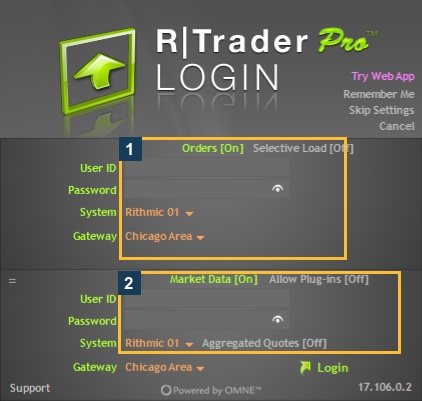
The inspected desktop version is 17.106.0.2. Box 1 marks the Orders section; box 2 marks Market Data and its plugin control. Follow the intended route's guide for On/Off choices. Do not copy all visible values into a different account's setup.
Work through the checks
- Use the provider's supported official download/interface link.
- Enter the issued trading credentials, checking for spaces and case changes.
- Select the assigned System and a supported Gateway.
- Review any required agreement route and answer classification questions truthfully. This is a certification question, not a cheaper-data toggle.
- Confirm that the expected account appears and that the intended data service supplies the exact contract.
- Learn the order-status and history views before relying on an order workflow.
- If using another application, check its connector and simultaneous-session arrangement.
- Use a suitable permitted test process before relying on automation; record the request, broker response and actual result separately.
This article is a preparation checklist. It does not demonstrate first-time agreement signing or a submitted order. Detailed onboarding remains in the first-login guide.
Understand what a working connection establishes

Connection status is useful, but it does not verify every exchange subscription, account risk rule or copier entitlement. The inspected native copier was unavailable for the user even though ordinary login worked. Do not activate copying or change risk values to experiment with those distinctions.
If something fails
Use the connection-failure guide to identify whether login, prices or account access failed. Preserve the error rather than repeatedly reinstalling software. If an order may already exist, verify account state before repeating the request.
For plugins, Quantower's official guide and Sierra Chart's support response show why one universal recipe is insufficient.
For common access and entitlement questions, check the Rithmic FAQ before interpreting a working login as full workflow permission.
Common questions
Is my provider website password also my Rithmic password?
Do not assume that. Use the credentials explicitly issued for trading.
Must I choose Rithmic Paper Trading for every evaluation?
Use the System assigned to the login. A provider can have a named environment.
Does successful login mean I am ready to trade?
Complete the account, data, permission and workflow checks first. Login is one step.
Should every beginner use automation?
That is a separate workflow decision. Confirm compatibility, permission and tested behavior; software does not supply a profitable strategy or guaranteed outcome.