
Rithmic is trading infrastructure, not the broker holding your retail trading account. Use the provider-issued login/System, verify exchange access separately and inspect actual order responses. The answers below distinguish account permission, platform capability and execution evidence.
Educational software guidance. Trading involves risk. Read the financial and information disclaimers.
Where should I start?
For a new issued account, follow first login. For a current failure, use the error index. If you are choosing software, start with the platform comparison.
Common account and data questions
| Question | Answer |
|---|---|
| Is my website password the trading password? | Not necessarily; use the separately issued Rithmic credentials. |
| Does funded mean Rithmic 01? | No. Use the provider-assigned System and actual account stage. |
| Does a live chart prove live exchange execution? | No. Simulated accounts can display live market prices. |
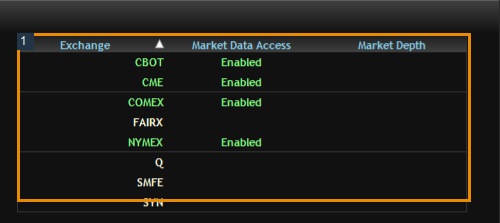
| Does data access include full depth? | Not automatically; check the depth entitlement. |
| Are all retail users non-professional? | No. Answer the exchange classification criteria accurately. |
| Does one login mean one trading account? | No. The inspected login exposed two account rows. |
Current trial and restriction answers
Rithmic's current FAQ describes a 14-day public trial with eligibility restrictions, and excludes its Web & Mobile product and the applicable Protocol demo use. A paid/eligible prop simulation is not automatically the same category as that temporary public trial.
The FAQ also distinguishes post-liquidation Liquidate Only/Admin Only modes, which can require manual clearing, from a Soft Loss Limit's behavior. Do not assume every account restriction disappears the next day.
Where do prices and tool permissions come from?
Compare the actual provider invoice with the exchange-fee guide. Native copier activation is provider-controlled; it was disabled for this login. PickMyTrade's Rithmic setup has its own compatibility rules, including Bulenox exclusion. A firm supporting Rithmic does not approve every automation or copier.
What do the screenshots prove?
Native captures show actual visible controls and status in the dated session, with private data concealed. Vendor illustrations are labeled separately. A connection screenshot is not a filled-order record; see the relevant guide for any remaining account-specific validation.
Screenshot references
Common questions
Can I reset a provider risk restriction myself?
Only through the provider-authorized process; do not try to bypass its controls.
Can I use the same login on unlimited devices?
No universal session allowance is established. Check the provider and interface.
Does an accepted webhook prove a fill?
No. Delivery, receiver validation, broker acceptance and execution are separate.
Where should I report an account issue?
Start with the issuing provider; use the platform vendor for its software/connector behavior.