
Rithmic provides technology for futures market data, order routing and account risk controls. RTrader Pro is one trading application that uses that technology. A broker or funding provider supplies your account access and its requirements; the word Rithmic alone does not identify a brokerage account, a permitted copier or a ready-to-trade setup.
Educational software guidance. Trading involves risk. Read the financial and information disclaimers.
Separate the parts of a setup
| Part | Role | What to confirm |
|---|---|---|
| Account provider | Issues the account/login and applicable terms | Account stage, permissions and support process |
| Rithmic technology | Provides data and trading infrastructure | Assigned System and service entitlement |
| Trading application | Displays information and sends supported requests | Supported connector, version and selected account |
| Exchange data access | Determines the market information you receive | Exchange, top-of-book/depth and subscriber requirements |
| Automation or copier | Adds another order-request workflow | Compatibility, provider permission and tested behavior |
Rithmic's broker page describes the relationship between brokers, FCMs and the technology. An FCM, or futures commission merchant, is part of the live-account access arrangement; it is not another name for a charting program.
What is RTrader Pro?
It is Rithmic's desktop trading interface. The official product page describes its data, trading and account tools. The desktop login inspected here has separate Orders and Market Data sections.
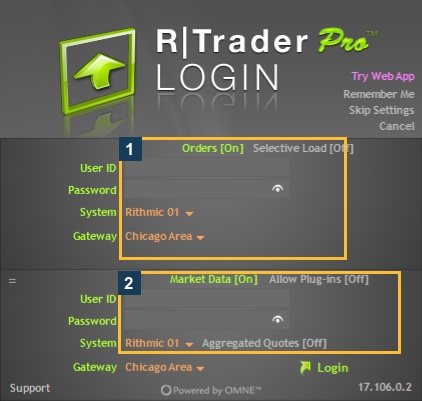
The application title, an account panel, a price display and a service indicator answer different questions. For example, green Price status does not prove that a particular account is allowed to trade. Check the intended account and exchange separately.
Can another platform use Rithmic?
Some platforms document Rithmic connectors, but compatibility is specific to the application, version and account. Quantower's connection guide documents a supported local-plugin route. Sierra Chart support identifies a same-account limitation in its connector. Do not apply one platform's setup to every other platform.
What should a new user check first?
- Confirm the account provider actually issued a Rithmic login for the intended account.
- Obtain its assigned System and supported Gateway.
- Use the application/version its current guide supports.
- Review the required agreement and subscriber-status route accurately.
- Verify login, expected account and market data as separate checks.
- Understand the order/exit workflow before relying on it. Login is not an execution test.
The beginner checklist expands these checks. This article does not quote account prices, current firm signup availability or a universal data fee; those depend on the particular offering.
Where does PickMyTrade fit?
An alert bridge is another application/service layer, not a replacement for the account provider. If that is your intended workflow, review the TradingView and Rithmic guide. Separately confirm broker compatibility, firm permission, generated alert configuration and observed order results. A connection does not establish those other facts.
Before choosing a route, evaluate Rithmic advantages and constraints against the account, platform and workflow you intend to use.
Common questions
Is Rithmic the same as my broker?
No. Distinguish the technology provider from the firm that issued your account and login.
Is RTrader Pro the only way to use Rithmic?
No universal requirement is established. Use a connector supported for the actual account and workflow.
Does Rithmic support mean a copier is available?
No. Copier entitlement and provider permission are separate. The inspected native user had a copier-access restriction despite successful login.
Does a connected chart prove the account can trade?
No. Market data, account selection and order permissions need their own checks.