
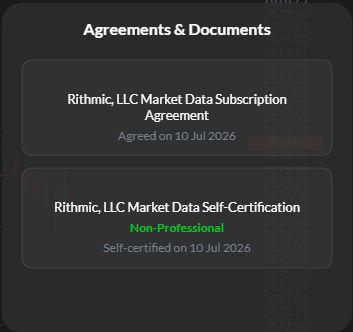
Use the agreement route supplied by your broker or prop firm. Read the subscription and self-certification forms and answer them accurately. In the R Trader Pro Web session inspected on 7 October 2026, Menu, then ?, then Agreements & Documents showed existing agreement status. That screen does not demonstrate the first-time signing process.
Educational software guidance. Trading involves risk. Read the financial and information disclaimers.
Before you start
Have the account provider's Rithmic login and assigned System. Check that any agreement link comes from the provider's official instructions. A website login and a trading-platform login may be separate.
Complete the required checks
- Open the provider's supported agreement route. EdgeClear documents both RTrader Pro and a linked web route; therefore desktop installation is not a universal requirement for every agreement workflow.
- Confirm the account/System before entering information.
- Read each form presented to you. The inspected web status screen names a Market Data Subscription Agreement and a Market Data Self-Certification. Do not assume that four separate exchange popups must appear.
- Answer the eligibility questions from your actual circumstances. Being a beginner, retail trader or evaluation-account holder is not enough information to determine classification.
- Submit only after you understand and agree to the terms. Keep the confirmation or status record available for your own reference.
- Reconnect as your provider instructs. Check exchange access separately if prices are still missing.
How do I choose subscriber status?
CME's Non-Professional Subscriber FAQ is the primary reference for its classification rules. Ask the distributor to resolve uncertainty before certification. This guide does not determine your eligibility or quote your account's fees.
What the observed status screen proves
The captured web panel displays previously completed records and dates. This example shows the location and labels of the agreement-status view; it does not demonstrate accepting an agreement or confirm subscriber classification, current entitlement, billing or order access.
If the forms or prices do not appear
| Situation | Next check |
|---|---|
| No first-login popup | Check the provider's agreement route and existing status |
| Existing records already shown | Ask whether this specific login needs any further action |
| Still no quotes | Check the System, market-data entitlement and competing data sessions |
| New login after an account change | Confirm requirements for the new credentials with the provider |
Do not repeatedly change classification, create accounts or reinstall software to force a popup. Escalate with the exact screen and error, excluding personal data.
Captured reference images
The captions distinguish observed web screens from vendor documentation and imported desktop references. The native and web panels record existing agreement status, separately from signing a new legal form or executing an order.
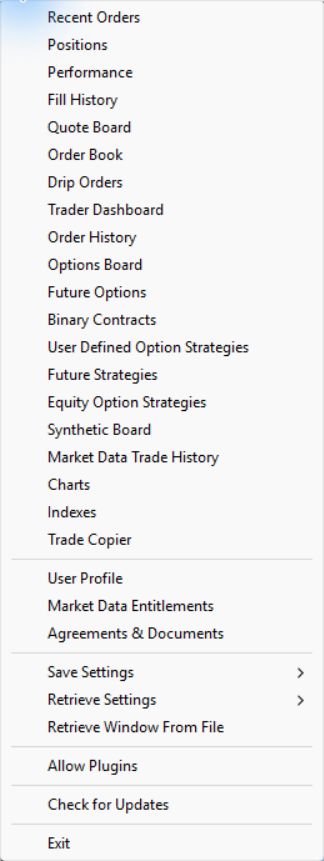
Desktop agreement-navigation reference
The earlier authentic desktop File-menu capture exposes Agreements & Documents, alongside other account-information entries. It establishes a navigation label for that inspection. No desktop agreement was accepted and no subscriber classification was changed.
First-time forms depend on the account and required records. The account used here had completed records, so its forms were not re-signed to manufacture a before/after example.
Current native status and data checks
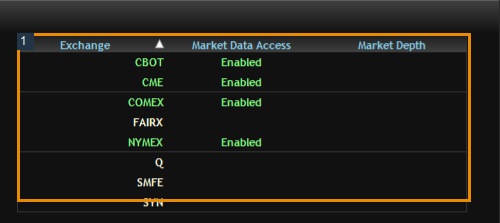
Open File → Agreements & Documents for the desktop status list. Then open File → Market Data Entitlements to inspect data access. The current native panels below were captured without changing subscriber status.

Common questions
Must everyone install desktop RTrader Pro to sign?
No universal requirement has been established. Follow the route documented by your provider; some offer a web route.
Does signing guarantee immediate live data?
No. Agreements, activation, exchange permissions and the current connection are separate checks. This review did not measure activation time.
Do agreements automatically transfer to a new funded login?
Confirm with your provider. Do not assume that a different username or System inherits the old login's status.
Should I choose Non-Professional because it is cheaper?
No. Select the classification for which you meet the applicable criteria. Ask the distributor if you are unsure.