
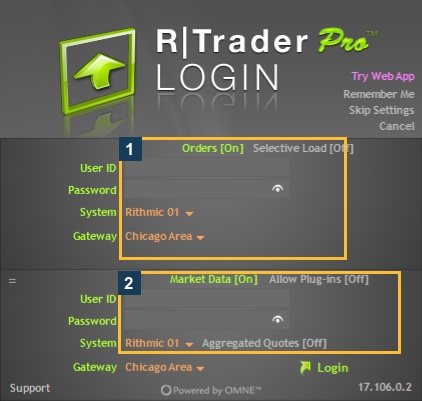
For a broker or funding-provider Rithmic login, use that provider's official recovery instructions or support channel. First distinguish the Rithmic trading password from your provider website password. The inspected desktop login has no visible Forgot Password control. Do not assume a website password reset also changes the trading login or invent a fixed lockout waiting period.
Educational software guidance. Trading involves risk. Read the financial and information disclaimers.
Identify which password failed
| Login | Where you use it | Who should confirm recovery |
|---|---|---|
| Provider website | Account administration or billing dashboard | That website's official recovery flow |
| Rithmic trading login | RTrader Pro or a supported Rithmic connector | Provider that issued the trading credentials |
| Platform vendor account | Software licensing or platform sign-in | Platform vendor |
| Automation service account | Its own dashboard | That service's official recovery flow |
Apex's login guidance explicitly distinguishes its website login from RTrader credentials. A working website password is therefore not evidence that you entered the correct trading password.
Before requesting a reset
- Record the exact rejection. A timeout or unavailable service is not the same as an invalid-password response.
- Check the current Rithmic credentials issued by the provider and the selected System. Avoid accidental spaces and case changes.
- Confirm that the relevant account is active with the provider. An expired or disabled account may need an account-status investigation instead of a password reset.
- If you receive an account-locked or too-many-attempts message, stop repeated retries and use official support. No universal retry interval is established by this guide.
Request recovery from the issuer
Use a support link reached from the provider's official website or authenticated dashboard. State that you need recovery of the Rithmic trading login, and include the error and timestamp. Do not send the current or new password in an ordinary message.
For example, Elite Trader Funding's troubleshooting guide routes forgotten or locked Rithmic logins to its support process. That is an ETF workflow; another provider may use a different portal or administrator. This guide does not claim that no interface anywhere can change a password.
Keep password recovery separate from an evaluation-account reset. An account reset can be a different operation with different terms; do not purchase or request one simply because the word “reset” appears in a login article.
After the provider confirms a new password
Inventory the applications that store that trading login, including separate order/data fields and any permitted automation connection. An old stored password can explain why one application works and another fails.
Before interrupting a working route, confirm the account state and any locally managed order actions. Update the appropriate stored fields according to each application's guide, reconnect when appropriate, and verify the expected account and services. Do not assume that entering the new password in one program updates the others.
Common questions
Does resetting my Apex website password reset Rithmic?
Do not assume that. Apex identifies separate trading credentials. Confirm which login its recovery process affects.
Is there a universal Rithmic Forgot Password button?
No such control was visible in the inspected desktop login. Use the issuer's documented recovery route for the specific login; this observation is not a survey of every Rithmic interface.
How long does a lockout last?
The reviewed sources do not establish a universal duration. Give the exact message to the issuer and follow its instructions rather than repeating guesses.
Can password recovery fix a copier-not-enabled message?
A successful login and copier entitlement are different. Ask the provider about the specific restriction; see copy-trading troubleshooting.