
Separate the connection environment, data entitlement, trading account and order state. System and Gateway identify connection choices; entitlement means permitted access; an acknowledgement is not a fill. These distinctions help you interpret Rithmic screens without assuming that one green indicator verifies every part of a workflow.
Educational software guidance. Trading involves risk. Read the financial and information disclaimers.
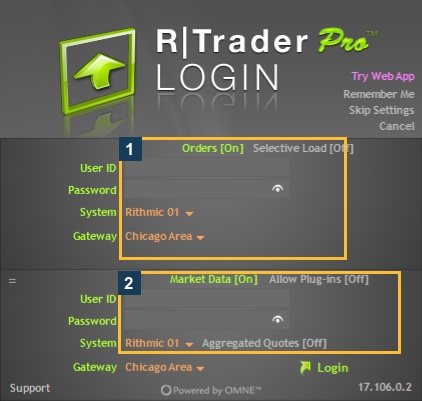
Login and connection terms
| Term | Plain-language meaning | Practical use |
|---|---|---|
| User ID | Issued trading login identity | May differ from the provider website login |
| System | Named connection environment | Use the label assigned to the login |
| Gateway | Supported entry point | Do not treat it as a complete API address |
| Session | A service connection | Data and order sessions can have separate limits |
| Direct connection | App connects through its own Rithmic connector | Check simultaneous-login restrictions |
| Plugin host | Local app serving a supported client connection | Confirm both host and client remain correctly connected |
| Entitlement | Permission to use a service or feature | Login success alone does not establish every entitlement |
Quantower's guide explains its local-plugin arrangement. Other connectors can differ. See Systems and Gateways for scoped native menu observations.
Market-data terms
| Term | Meaning |
|---|---|
| Bid / ask | Prices at which participants are bidding to buy or offering to sell |
| BBO / top-of-book | Best bid and offer with their quantities |
| Market depth | Additional book price levels supplied by the exchange/data route |
| MBO | Market-by-order information about individual displayed orders |
| DOM | Depth-of-market display, often a price ladder |
| Historical data | Earlier market information used to build past charts or analysis |
| Specific contract | A futures contract for a particular expiry |
| Continuous chart | A chart series connecting expiries; not automatically a tradable contract identifier |
Rithmic's FAQ distinguishes top-of-book and depth. Confirm the required data entitlement for the exact instrument. A price ladder's existence does not prove every level is authorized or current.
Order-state and management terms
| Term | Meaning and limit |
|---|---|
| Request | An application asks for an action; the result still needs confirmation |
| Acknowledgement | A recorded response accepting/recognizing the request at that stage; not a fill |
| Working order | An order reported active, subject to its current status and conditions |
| Fill / partial fill | Recorded execution of all or part of the quantity |
| Rejection | A request was refused; inspect its exact reason |
| Cancellation | A recorded removal of the remaining working quantity |
| Bracket | A related entry/exit arrangement; verify how children are created and managed |
| OCO | One cancels the other; verify where that linked management runs |
| Trailing stop | A stop-adjustment workflow; its trigger and hosting depend on the configuration/route |
These are reading aids, not proof of support for every order type. NinjaTrader's order-location guide demonstrates why order hosting and management need connector-specific checks.
Account and risk terms
Position is the account's current exposure in a contract. P&L means profit and loss; confirm whether a displayed measure is realized, unrealized or otherwise calculated. Auto-liquidation is a configured account action whose criteria and effect must be verified for that account. Liquidation-only and locked are separate labels whose allowed actions can depend on the provider and controls.
Do not use a risk-field label to infer a guaranteed maximum loss, reset time or permission to change an administrator setting. Rithmic's risk product description gives product context; the field guide records account-scope limitations.
Common questions
Is an account the same as a login?
No. A login can expose account access, but each account's state and permissions still need checking.
Does working mean filled?
No. Read the recorded order status and actual fills separately.
Is a chart symbol always valid in an alert payload?
No. Use the relevant connector or service's current symbol requirements and resolved contract.
Is broker connectivity the same as copier eligibility?
No. Copier support, entitlement and provider permission are separate questions.