
Evaluate the complete setup: provider account, application, data entitlement, order workflow and costs. Rithmic offers desktop and developer interfaces, but compatibility, session limits and enabled features vary. Do not choose it from a blanket “fastest,” “most reliable” or “best for all prop firms” claim. This guide is a comparison checklist, not a recommendation of a particular account or purchase.
Educational software guidance. Trading involves risk. Read the financial and information disclaimers.
Potential advantages and the matching checks
| Available capability | Why it can matter | What still needs checking |
|---|---|---|
| Desktop account/data tools | One supported interface for inspecting a setup | Account access and relevant feature entitlement |
| Third-party connectors | Allows a supported platform choice | Exact version, account and route |
| API families | Different options for custom development | Kit access, conformance, provider permission and fees |
| Data and risk infrastructure | Provides components for a trading workflow | Exchange subscription and account-specific enforcement |
| Local-plugin arrangements | Can support sharing data in some setups | Host/client compatibility and separate session limits |
Rithmic's product page and API page describe available products. These descriptions do not establish measured end-to-end execution or every connector's use of a feature.
Practical limitations to assess
Quantower documents its plugin route; Sierra Chart support identifies a same-account restriction. This is a concrete reason to compare the actual connector rather than only the words “supports Rithmic.”
Desktop, web, mobile and API interfaces also have different requirements. A supported desktop account does not automatically authorize a custom production application. A visible Trade Copier entry does not prove copying is enabled: the native user inspected for this library received an entitlement restriction.
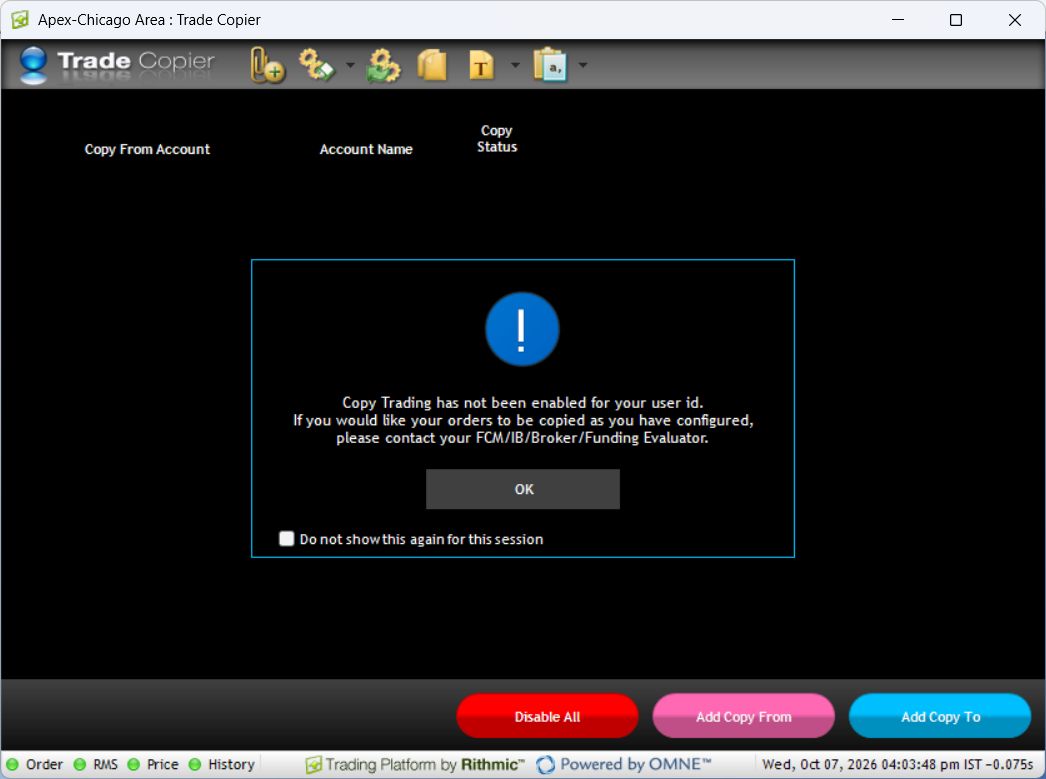
Do not generalize that restriction to every user or promise that logging in again removes it.
Compare total cost and operational dependency
Ask for the actual account offering's platform charges, exchange data classification/depth costs, session fees and optional service fees. This guide quotes no universal monthly total. A free desktop download does not prove every required account or data service is free.
Document what must stay running, where protective logic is managed and what the supported recovery path is. Renting a VPS or using cloud automation changes part of that setup; it does not guarantee availability, firm permission, capped losses or fills.
A decision checklist
- Confirm the provider/account stage supports the intended route.
- Check the exact application and connector version.
- Identify required exchanges, depth/history and agreement eligibility.
- Obtain current fees for the complete setup.
- Confirm sessions, copier/automation entitlement and provider rules independently.
- Verify the intended workflow in a suitable permitted environment before relying on it.
No benchmark or comparison against CQG, Tradovate or another provider was performed here. Use reproducible workflow evidence before publishing comparative speed or uptime rankings.
Common questions
Is Rithmic better than every alternative?
No universal ranking is established. Compare your required platform, account, data, costs and operational workflow.
Does API availability mean I can automate my account?
Confirm application access and provider permission separately. The API guide explains those gates.
Does Rithmic connectivity prove copier support?
No. Compatibility, enabled entitlement and permission are separate.
Does a successful demo prove live execution quality?
It supports only the recorded environment and result. It does not guarantee later live fills or trading outcomes.