
Your data bill depends on exchange, subscriber classification, depth level and provider pricing. CME publishes exchange fee schedules, but your broker or firm may bundle or add charges. A free trading platform does not automatically include exchange data.
Educational software guidance. Trading involves risk. Read the financial and information disclaimers.
CME non-professional reference, effective January 2026
| Subscription | Per exchange / device / month | Four-exchange bundle / device / month |
|---|---|---|
| Top of book | $1.55 | $4.65 |
| Market depth | $12.10 | $36.50 |
Source: CME Group 2026 fee list, checked 7 October 2026. The bundle covers CME, CBOT, NYMEX and COMEX under the applicable terms. These are exchange schedule figures, not a quote for your provider's retail package. Professional and non-display uses have different categories; obtain the applicable current schedule instead of applying these non-professional rates.
Read your subscription and invoice together
Record the exchanges, depth level, classification, number of billable devices/connections, billing month and each provider line item. Ask whether the charge is exchange data, Rithmic access/routing, software, copier or another add-on. An invoice can include several of these without any being a duplicate.
For example, needing ES and YM involves CME and CBOT. Compare the provider's two-exchange quote with its bundle offer and the depth needed by your platform. Do not buy depth solely because a ladder window exists.
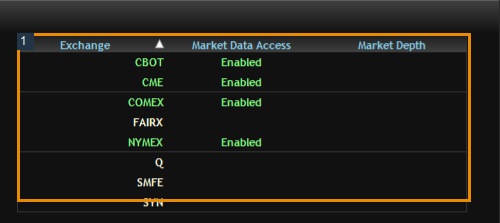
Check the actual status panels
In the inspected desktop, File → Agreements & Documents shows agreement status and recorded subscriber classification; File → Market Data Entitlements lists exchange access and depth separately. A previously completed form should not be re-signed simply to obtain a screenshot. Classify yourself accurately under the applicable exchange definitions.
Extra connections and order-only workflows
A plugin route can share a supported RTrader Pro data connection, but this does not establish a universal fee exemption. Ask the provider how your actual direct sessions, devices and routing-only service are billed. Logging out partway through a month does not prove the subscription or next charge was cancelled.
Screenshot references

Common questions
Is Level 2 always included with Rithmic?
No. Check the depth entitlement and provider package.
Can I select non-professional merely to save money?
No. Your classification must match the exchange criteria.
Are these my final retail fees?
No. Confirm your provider invoice, taxes and separate access/software charges.
Does deleting the platform cancel data billing?
No. Use the provider subscription process and retain confirmation.