
Auto-liquidation is a configured response to an account risk condition. Check which criterion triggered, whether closing orders completed, and what account status followed. Do not assume every event cancels every order, permanently disables the account, or clears at the next session.
Educational software guidance. Trading involves risk. Read the financial and information disclaimers.
Reconstruct the event
- Record the event time and timezone, System and account privately.
- Review current positions and working orders before sending another instruction.
- Compare Order History and Fill History to distinguish requests from completed executions.
- Inspect the provider's effective risk settings and any trigger-status information.
- Ask the provider to confirm the trigger and restoration process if the account remains restricted.
An automated alert or connected platform cannot remove an administrator restriction. Repeated retries can obscure the evidence and do not establish recovery.
What was verified
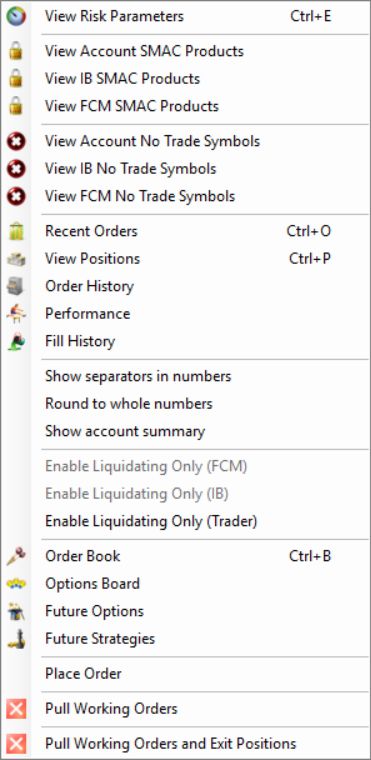
In R Trader Pro desktop 17.106.0.2 on 7 October 2026, File, then Trader Dashboard, then the account's View Risk Parameters command opened separate FCM Administrator, IB Administrator and Trader tabs. Only navigation and labels were inspected. No values were edited, applied or tested by placing an order.
Rithmic describes its risk controls as server-based, including liquidation triggers and distinct account states. That design does not guarantee an exit price, a specific time to completion, or the availability of every setting to an individual trader.
Liquidation and a trading lock are separate
The Trader tab contains Liquidate Only On Auto Liquidate and Lock On Auto Liquidate. Rithmic's current FAQ, checked 7 October 2026, explains that a liquidation can leave an account in Liquidate Only or Admin Only, depending on its configuration. Those states require manual clearing; do not expect a new trading day or a platform restart to clear them.
That statement describes the resulting account modes. It does not grant a trader permission to edit administrator settings or establish that the two checkboxes are interchangeable. For a restricted account, ask its provider to identify the active mode and the authorized reset route. A Soft Loss Limit is a different criterion: Rithmic describes it as resetting after it fires, so it must not be treated as a persistent daily lock.
Older guidance saying liquidation alone does not disable trading addresses a different configuration. The useful check is the actual resulting mode, rather than the word “liquidation” by itself.
Do not infer the cause from the final balance alone
The final balance may reflect fills, fees and market movement after the triggering condition. A profitable closed trade does not rule out an earlier intraday drawdown condition. Ask for the exact trigger value and time rather than estimating them from the ending balance.
Read the account display

The blank headroom cells in this capture must not be read as zero or unlimited allowance. Use the configured rule and the provider record when a display does not supply a number.
Common questions
Will restarting R Trader Pro unlock the account?
Not necessarily. Restarting a display does not establish that a provider-controlled restriction has been cleared.
Is auto-liquidation the same as a stop loss?
No. An account risk condition and an order's stop trigger operate at different scopes. Review both the account rules and the order instructions.
Can a liquidation exceed the configured loss amount?
Yes, a threshold is not a guaranteed execution price or final account result. Confirm actual fills and remaining exposure.
Does the restriction always reset tomorrow?
Rithmic says post-liquidation Liquidate Only and Admin Only modes require manual clearing. Ask the provider which mode was set; a Soft Loss Limit and a provider session rule are separate cases.