
Use Presets → Options for option defaults, and confirm size is expressed in contracts. An option contract count is not a stock share count. Preview the exact expiry and strike along with the defaults.
Educational software guidance. Trading involves risk. Read the financial and information disclaimers.
Step by step
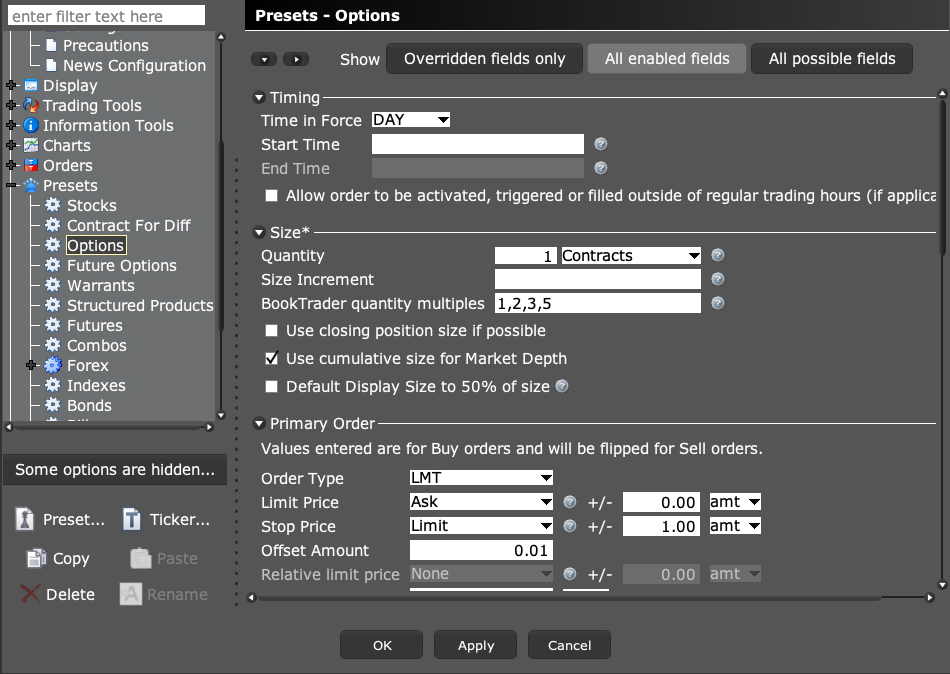
- 1 Open Global Configuration → Presets → Options.
- 2 Read Quantity under Size and confirm the unit shown is Contracts.
- 3 Check the primary order type, limit-price reference, and time in force.
- 4 Inspect any attached stop or target settings that could add child orders.
- 5 Open a new paper option ticket and check contract, count, and prices before sending the order.
A practical example
A stock ticket may start with 100 shares, while an option ticket starts with one contract. Those numbers use different units. Check the label next to the size field before you change it. Then check the option’s own full name. A perfect set of defaults on the wrong strike or expiry is still the wrong order.
Screen reference
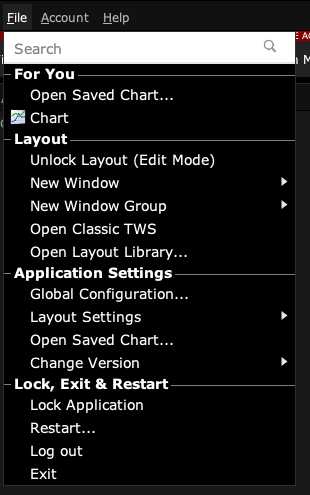
Start in Mosaic with File → Global Configuration. Then choose the panel named in the steps.
Mistake to avoid
Common questions
Are futures options in the same preset category?
TWS has a separate Future Options category.
Does a preset prove an option can trade outside hours?
No. Product and exchange eligibility still apply.