
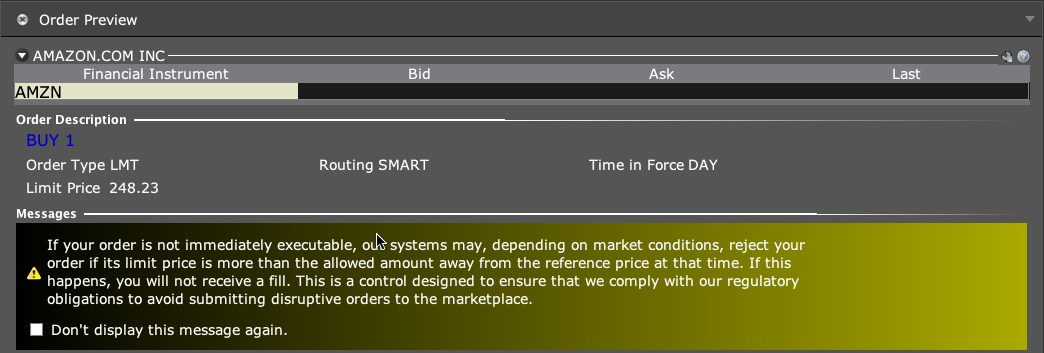
Use Preview on a proposed TWS order to check estimated margin impact before sending. Confirm the contract and size first. An estimate is not a guarantee that the eventual order will be accepted or filled.
Educational software guidance. Trading involves risk. Read the financial and information disclaimers.
Step by step
- 1 Create the intended order ticket in the correct account without sending it.
- 2 Check symbol, expiry, side, size, and order type.
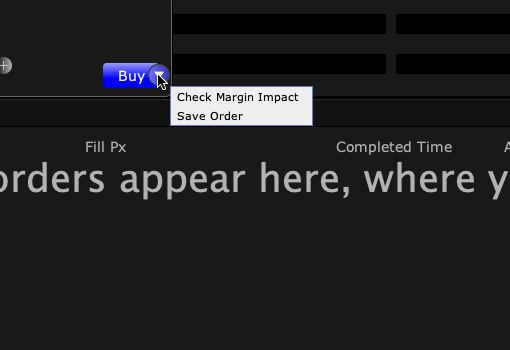
- 3 In Mosaic, open the small arrow beside Buy or Sell and choose Check Margin Impact. Read the Order Preview and its Current, Change and Post-trade margin columns. Do not click Transmit to check the estimate.
- 4 Compare the estimate with the account’s available resources and any broker warning.
- 5 Close or revise the ticket if it does not match your intent; submit only as a separate planned trading decision.
A practical example
You plan a trade but first want to see its estimated effect on funds. Open Preview for the exact contract and size. Read the estimate, then close the ticket if you are only checking. A preview of one contract does not tell you the cost of a different month or size. It also does not promise that the estimate will stay the same as prices and the account change.
Screen reference

Mistake to avoid
Common questions
Does Preview place the trade?
Use the preview function, then treat sending as a separate action.
Is the estimate fixed until I submit?
No. Account and market conditions can change.