
Error 502 means the app could not open its connection to TWS or IB Gateway. Start with the running program, host, and port. This is usually a connection setup problem, before an order reaches the broker.
Educational software guidance. Trading involves risk. Read the financial and information disclaimers.
Step by step
- 1 Check that TWS has finished logging in. A login screen is not a ready API session.
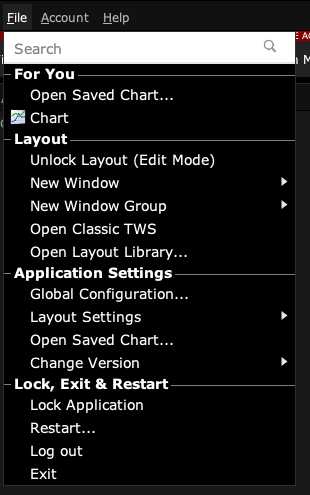
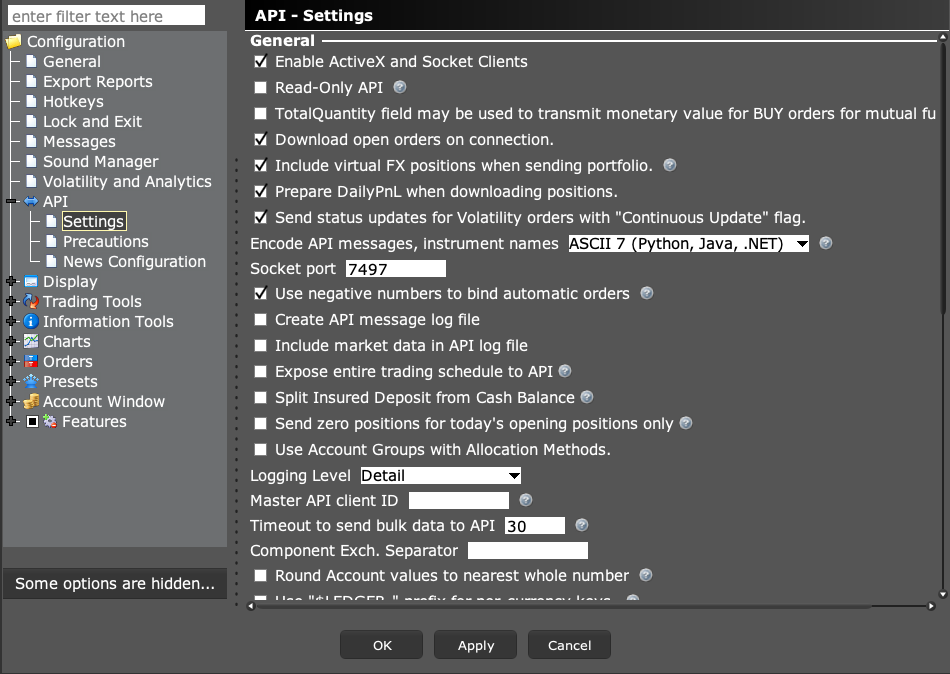
- 2 Open Global Configuration → API → Settings. Confirm socket clients are enabled and write down Socket port.
- 3 Compare the app host with the machine running TWS. Use 127.0.0.1 only when both apps run on the same machine.
- 4 Match the port exactly. TWS paper commonly uses 7497; Gateway paper commonly uses 4002. Custom ports are possible.
- 5 Reconnect once. If it still fails, check the app connection log and the local firewall rule for this specific connection.
A practical example
Suppose TWS shows port 7497 but the app tries 4002. The app is knocking at the wrong door. Change the app’s port to the value you read in TWS, then try to connect once. If the app is on a second computer, check the host too. The number 127.0.0.1 means this computer. It does not mean the other computer where you left TWS open.
Screen reference
Start in Mosaic with File → Global Configuration. Then choose the panel named in the steps.
Mistake to avoid
Common questions
Is 502 an order rejection?
No. It concerns the connection, before normal order processing.
Should I disable my firewall?
Use a narrow rule for the needed connection. Do not turn off the whole firewall.