
Start with copier access, then the configured account relationship, and finally each account's order and fill records. An absent copy, a rejected follower and a delayed display require different checks. Do not assume one cause from the visible position alone.
Educational software guidance. Trading involves risk. Read the financial and information disclaimers.
If copy trading is not enabled
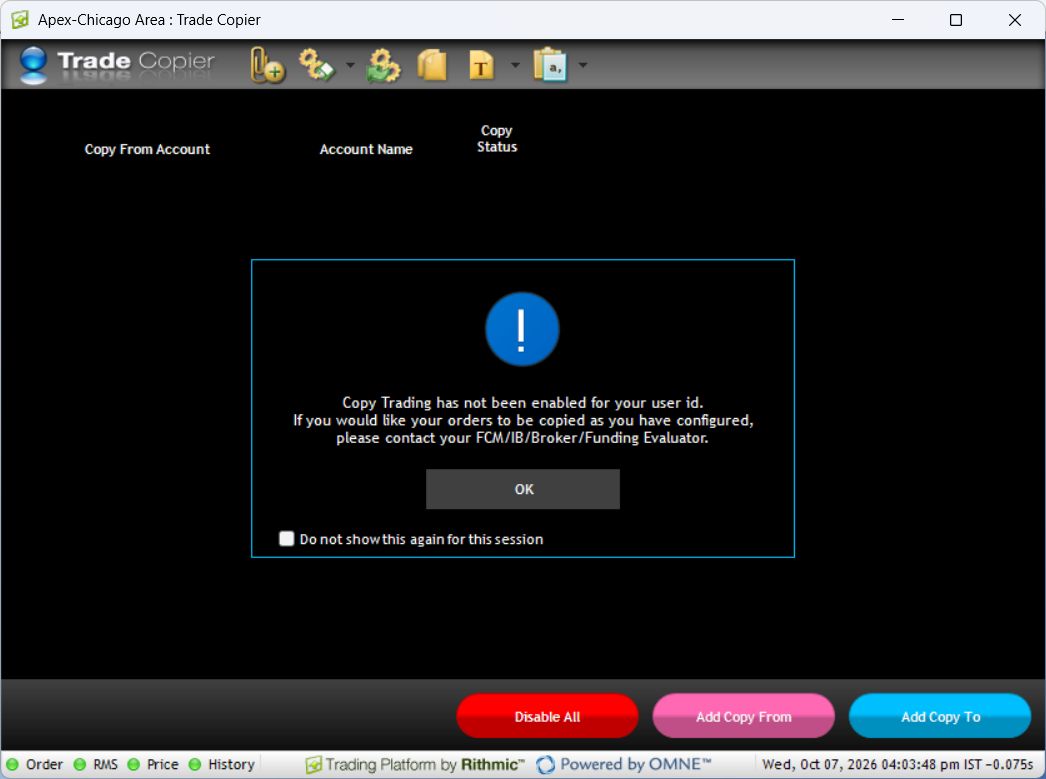
Open File, then Trade Copier. In the inspected desktop session, the application said copying was not enabled for this user and directed the user to the provider. A login or reinstall cannot establish the missing entitlement.
Match the symptom to evidence
| Symptom | Next check |
|---|---|
| No relationship can be activated | Provider eligibility, account access and exact message |
| No follower order appears | Source event, relationship status, destination identifier and order history |
| Destination quantity differs | Size setting, rounding rules, partial fills and existing position |
| One follower rejects | Its complete rejection, account permissions and risk state |
| Display appears delayed | Compare event timestamps and execution records before assuming delayed execution |
| Unexpected extra order | Review other copiers, alerts, retries and manual routes for the same account |
Do not assume a failed follower leaves all others unaffected. Inspect every participating account. Different fills require examination; this guide does not prescribe a normal delay or slippage allowance.
Reconcile before retrying
- Preserve the source event and its timestamp.
- Record the expected destination account, contract, side and quantity.
- Check whether a destination order exists, is pending, was rejected or has fills.
- Compare current positions and remaining working orders.
- Resolve the identified cause before a new instruction.
Do not manually recreate an uncertain copy merely because it is absent from one display. Keep new automation changes separate from investigation so the event sequence remains understandable.
Provider guides and evidence limits
DayTraders' troubleshooting guidance warns that acting on a follower while copying remains active can create an unintended position. Follow its leader-first instructions for its supported workflow and reconcile every account afterward. Do not layer another copier over the same relationship to diagnose a failure.
Rithmic's release notes establish administrator-controlled copying permission. An access error therefore belongs with the account provider; an unexplained order result needs the event and order records described above.
The inspected login was not enabled for native copying. This article is a documented setup or diagnostic guide; it does not claim that copied orders, partial fills, rounding, cancellations or reconnect recovery were tested. Obtain account-specific confirmation before using behavior that the cited guide does not specify.
If the provider cannot enable the intended relationship, compare alternatives to native Rithmic copying without assuming another tool bypasses account restrictions.
Common questions
Will restarting restore copier access?
Not necessarily. If the message identifies a disabled entitlement, ask the provider about activation and supported accounts.
Should I switch to another copier immediately?
First reconcile existing positions and orders. A different service still needs supported connections and provider permission; it does not resolve uncertain existing exposure.
How should I report a missing copy?
Provide the version, System, source event, affected destination, timestamps and exact responses privately. Exclude passwords and API secrets.
Are fills expected to match exactly?
Do not assume identical fills. Compare the actual records and the copier's documented behavior rather than treating a configured size relationship as an execution guarantee.