
If native copying is unavailable, compare supported manual account selection, a platform-specific copier and a cloud alert receiver against the actual account arrangement. None should be assumed compatible, cheaper or faster without checking its current requirements and evidence.
Educational software guidance. Trading involves risk. Read the financial and information disclaimers.
Compare by job
| Approach | Useful when | Essential check |
|---|---|---|
| Manual account selection | Each account is managed deliberately | Keep other accounts' working orders and positions visible |
| Native Rithmic copier | Provider enables the supported account relationship | Entitlement, quantity handling and shutdown behavior |
| Platform-specific copier | Its documented connector/account combination fits | Licence, local-host dependency and supported event types |
| Cloud TradingView receiver | The source is a supported alert workflow | Exact account mapping, schema, compatibility and firm permission |
Diagnose the native limitation first
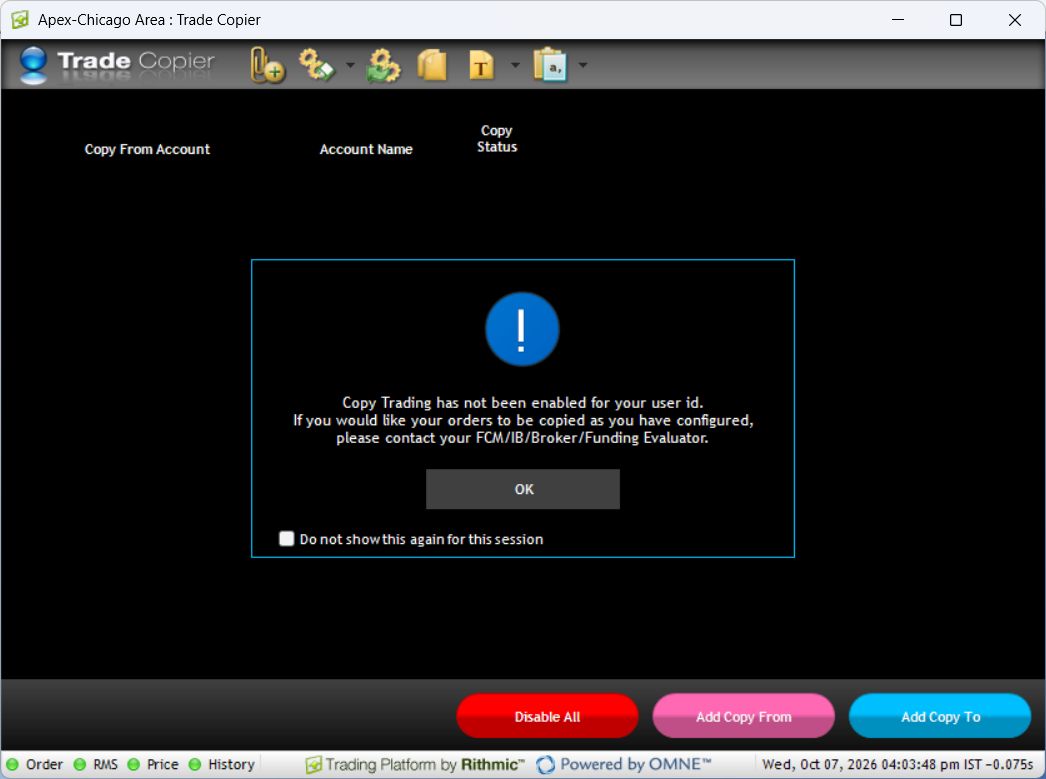
The inspected Trade Copier window says copying is not enabled. That is an account-level access result, not evidence the feature is absent from RTrader Pro or free for every provider. DayTraders' official guide gives a provider-specific add-on example.
Evaluate an alert receiver accurately
PickMyTrade's current Rithmic setup supports a documented connection/generator workflow, with Bulenox excluded and the temporary public Rithmic trial unsuitable for its Protocol route. That is not a blanket cross-firm copying promise. A cloud receiver needs a valid signal, destination configuration and separate result monitoring.
Build a meaningful comparison
Record eligible source/destination accounts, event types, exit dependencies, reject/reconnect behavior, account limits and total recurring cost. Include exchange data and optional add-ons, not just a headline software price. Require dated evidence for a speed claim. Do not install overlapping copiers on the same destinations while comparing them.
Screenshot references
Common questions
Does a disabled native copier require a VPS upgrade?
No. More CPU does not grant provider entitlement.
Can any Rithmic account use any bridge?
No. Check documented compatibility and account permission.
Is manual selection copying?
No. Each manual order still needs its own destination check.
Which alternative is guaranteed best?
No universal ranking is supported; compare the required workflow and current terms.