
Confirm the firm’s rules for the exact account stage and proposed copying arrangement before selecting a tool. A Rithmic connection or visible copier does not establish permission. Account ownership, eligible destinations, sizing and each account’s independent risk limits all matter.
Educational software guidance. Trading involves risk. Read the financial and information disclaimers.
Check the permitted relationship
Record who owns and controls every account, whether copying crosses firms or account stages, which tool generates the actions and whether another strategy/copier is active. Read the applicable current agreement instead of using a generic firm yes/no list.
Apex's current user agreement includes ownership and additional conditions for copying. Separately labeled legacy PA material can be more restrictive. Apply the agreement for the actual account generation; a vendor's tool compatibility statement cannot resolve a firm-policy conflict.
Check the native copier entitlement
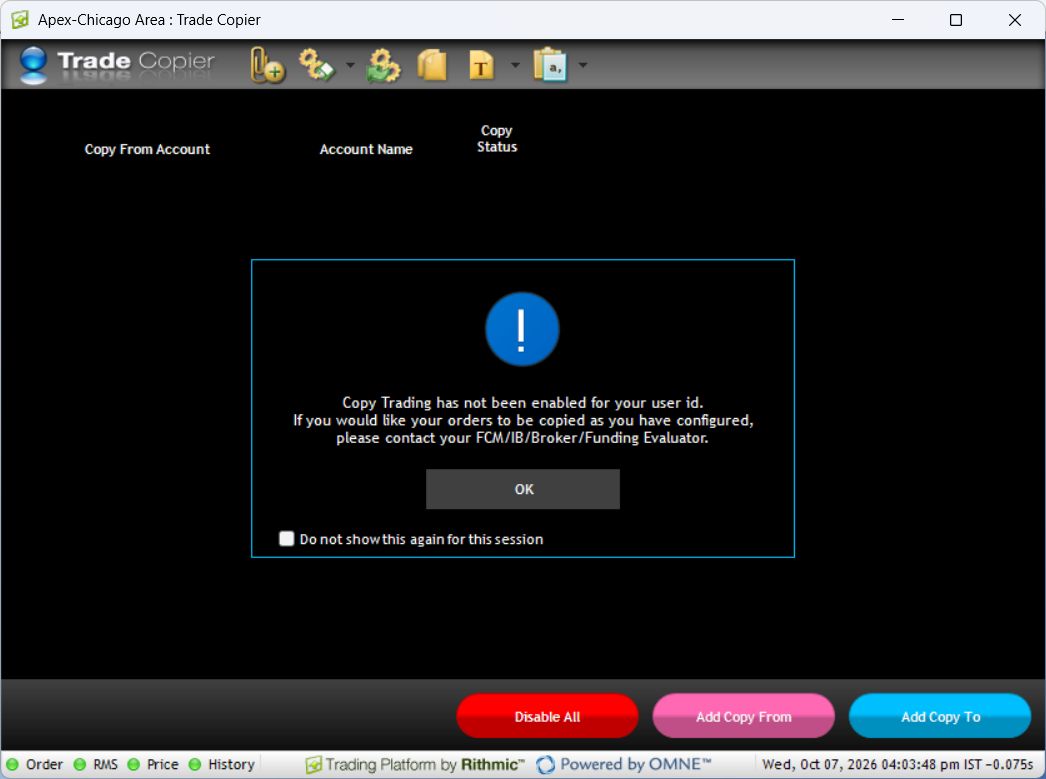
The local File → Trade Copier window exists but says copying is not enabled for this login. Ask the issuing provider about eligibility and terms through its official process before relying on an add-on. DayTraders documents its own add-on; its pricing is not a quote for another firm.
Review each destination
| Item | Why a leader's success is insufficient |
|---|---|
| Account status | A follower can be restricted or inactive |
| Permitted quantity | Scaling and position limits can differ |
| Existing exposure | A copied action may increase or reverse a different starting position |
| Margin / drawdown | Each account can reject or breach independently |
| Order and fill state | An accepted request is not necessarily a complete fill |
Keep the route singular and observable
Avoid overlapping copier paths or a circular relationship. Before individually closing a follower, follow the copier's documented disable/leader sequence. Reconcile all remaining orders and positions afterwards. If using a webhook receiver, verify its account mapping and provider compatibility independently; PickMyTrade's current Rithmic guide excludes Bulenox.
Screenshot references

Common questions
Does owning both accounts automatically permit copying?
Ownership can be necessary without being sufficient; check all applicable account conditions.
Does a copier bypass the follower risk limit?
No. Each destination remains subject to its own checks.
Can I assume a same-login restriction or unlimited destinations?
Use the selected copier’s actual supported relationship and provider entitlement.
Is a public forum reply policy approval?
No. Use current official rules and account-specific clarification where needed.