
Error 101 means the active market-data requests exceed the account’s available capacity. TWS windows and API clients can consume that capacity together. Close unused requests before adding more.
Educational software guidance. Trading involves risk. Read the financial and information disclaimers.
Step by step
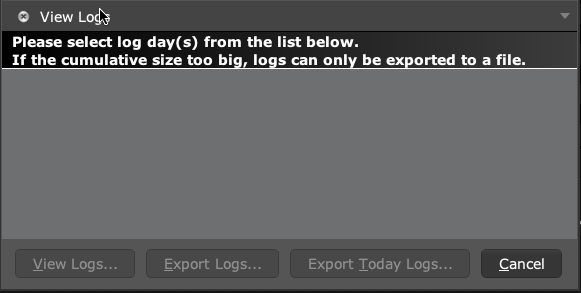
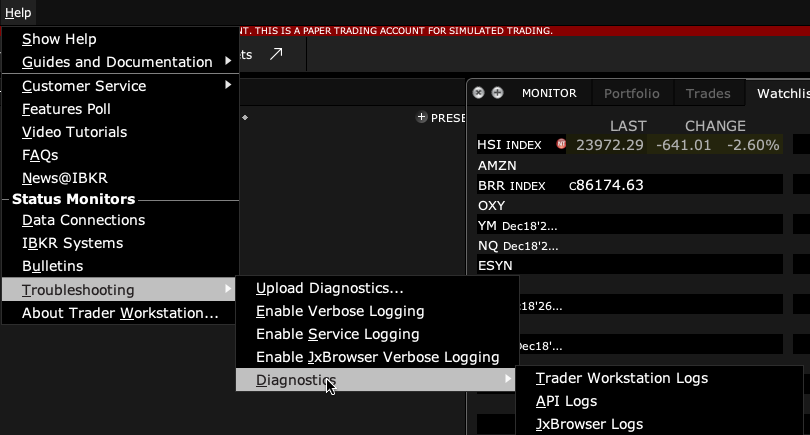
- 1 Save the full app message first. To check a recorded TWS API log, open Help → Troubleshooting → Diagnostics → API Logs. Select its date and choose View Logs. If the list is empty, enable API logging before the next event.
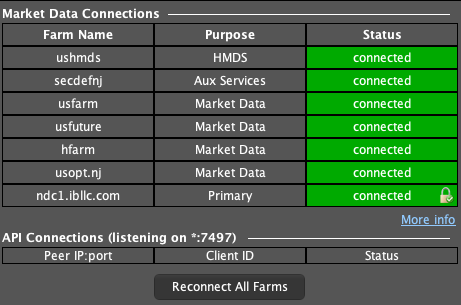
- 2 List open watchlists, charts, scanners, and connected API apps.
- 3 Remove unused symbols or close unused data windows.
- 4 Have the API app cancel subscriptions it no longer uses instead of only hiding them.
- 5 Retry one needed symbol and check whether the error clears.
- 6 If the workload truly needs more lines, review IBKR’s current allocation rules and available options.
A practical example
You open a second chart workspace while an API app watches many symbols. A new quote now fails. Close data views you no longer need and retry one symbol. If the app keeps old requests active, closing a visible tab may not be enough. Ask it to cancel the unused feed requests. The goal is to free capacity for the quotes you actually use.
Screen reference
How to confirm the result The needed symbol should receive data while the total active workload stays within its allowance.
Mistake to avoid
A hidden app may keep its data subscriptions active. Hiding a window is not proof that requests were cancelled.
Common questions
Is this a missing exchange subscription?
No. Capacity and exchange data access are different checks.
Will a second API connection add free capacity?
Do not assume it creates a separate account allowance.