TWS settings and performance

How to enable TWS API logs for troubleshooting

Quick answer

TWS can record messages exchanged with an API client. Open API → Settings, enable Create API message log file, and use the requested logging level. Enable logging before reproducing the problem so the useful event is captured.

Educational software guidance. Trading involves risk. Read the financial and information disclaimers.

Step by step

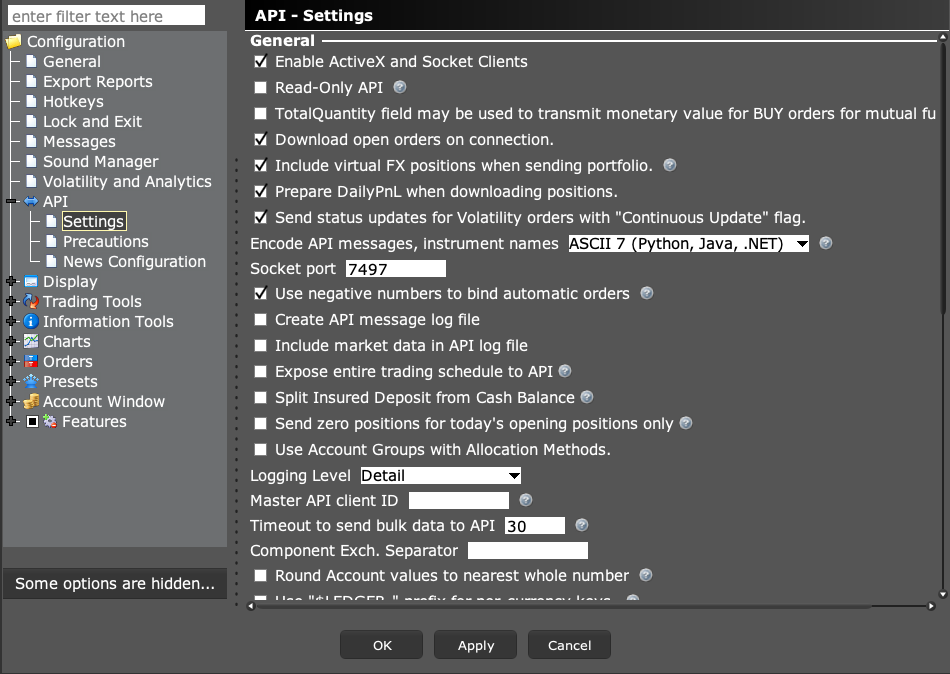
  1. 1 Open Global Configuration → API → Settings.
  2. 2 Select Create API message log file and set Logging Level to Detail when collecting a diagnostic case.
  3. 3 Decide whether market-data logging is needed; it can increase log size a lot.
  4. 4 Apply the change, reproduce the issue once, and record the time and time zone.
  5. 5 Export the needed log through TWS and remove secrets before sharing it with support.

A practical example

You turn on logs at noon, but the failure happened at eleven. The new setting cannot recreate the old messages. Leave it on for a planned repeat of the issue, note the exact time, and export that short case. If you add price data to the log, watch file size too. Turn a focused diagnosis into a small file support can read, not a large dump with no clear start point.

Illustrative scenario, not a record of a trade placed during this review.

Screen reference

Start in Mosaic with File → Global Configuration. Then choose the panel named in the steps.
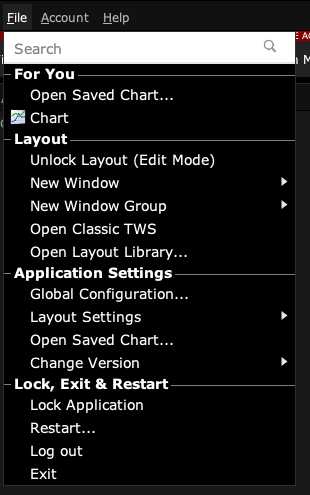
TWS Mosaic File menu with Global Configuration and Layout Settings
Open Global Configuration from File in Mosaic. This capture excludes the account header. Captured in TWS paper mode on 3 October 2026. Open the image for full size.
TWS API Settings showing socket clients, read-only access, port and logging
Find the named control in API → Settings. The displayed values belong to a paper session and are examples, not universal recommendations. Captured in TWS paper mode on 3 October 2026. Open the image for full size.
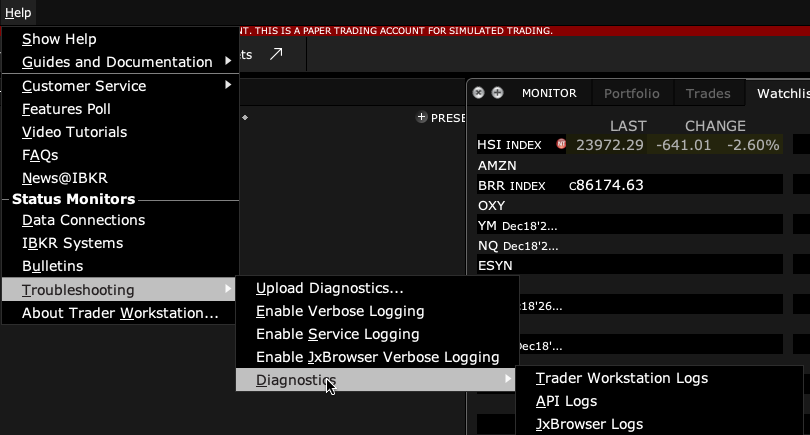
Help, Troubleshooting, Diagnostics menu leading to API Logs
In this build, follow Help → Troubleshooting → Diagnostics → API Logs. Upload Diagnostics is a different action. Captured in TWS paper mode on 3 October 2026. Open the image for full size.
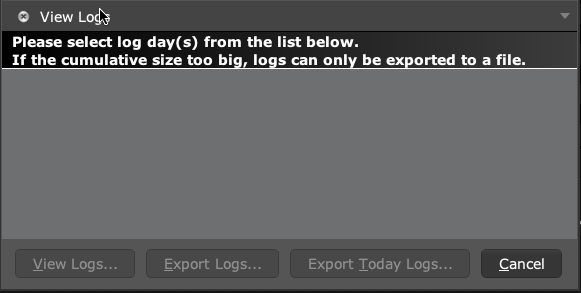
TWS View Logs dialog with View Logs, Export Logs and Export Today Logs buttons
This session has no recorded API logs in the list, so export buttons are disabled. Enable API logging before the event you need to capture. No log was exported or uploaded for this screenshot. Captured in TWS paper mode on 3 October 2026. Open the image for full size.
How to confirm the result The exported log should cover the event and identify the request or order being investigated.

Mistake to avoid

Do not post full raw logs publicly. They can contain account and trading details.

Common questions

Will enabling logs recover yesterday’s missing messages?

No. Capture must be enabled when the event occurs.

Are local logs always plain text?

IBKR documents encrypted local logs and an export workflow for reading them.

Financial and information disclaimers

Financial disclaimer

These guides explain software. They are for education, not financial, investment, tax, or legal advice. No example is a suggestion to buy or sell a product or use a trading strategy. Trading can lose money, including all funds you put at risk. With margin, futures, short sales, or some options, losses can exceed your starting funds. Automation can fail, send duplicate orders, or act late. Stops do not guarantee a fill or a price. Review your orders and positions, and seek advice from a qualified professional for your own needs. Paper trades, examples, and past results do not predict live results or promise a profit.

Information disclaimer

This is general help based on the sources and check date shown on the page. Screens, settings, fees, data access, and product support can change or differ by app version, account, country, and broker. The content may contain errors or become out of date; accuracy, completeness, and continuous service are not guaranteed. Check current broker and app instructions before acting. Screenshots show where controls are; they do not prove that an order test passed. This guide does not replace broker terms or risk notices. References to IBKR and TradingView identify their products and do not imply their endorsement of this guide.

IBKR risk disclosures · IBKR paper-trading limits · SEC guidance on automated investment tools

PickMyTrade help · Independent guidance for Trader Workstation and the desktop integration. TWS images show paper trading. Other applications are named in the image captions. Settings and availability can vary by version and account.

Automate TradingView alerts to Interactive Brokers

See the IBKR integration