
Define the delay you want to measure: alert triggering, webhook delivery, recipient processing, order acknowledgement, fill or quote display. Record comparable timestamps before changing the setup. A lower network ping, nearby VPS or marketed API latency is not a measured guarantee of your end-to-end result.
Educational software guidance. Trading involves risk. Read the financial and information disclaimers.
Identify the stage
| Stage | Useful evidence | Limit |
|---|---|---|
| Signal to alert | Script context and actual trigger time | Historical backtest timing is not a live event |
| Alert to recipient | Delivery/service timestamps | Clocks and timezones must be reconciled |
| Recipient to acknowledgement | Recorded request and broker response | Does not establish a fill |
| Acknowledgement to fill | Broker execution records | Depends on order conditions and market state |
| Market event to display | Source and display timing | A screenshot alone does not measure the interval |
No benchmark was performed for this guide. The native quote reference supplies actual field context, not a measured elapsed time:

Compare changes deliberately
- Fix the same product/expiry, application version and workload for a comparison.
- Record the exact event definition and timestamp source, including timezone.
- Identify local-plugin, direct or cloud dependencies.
- Change one supported variable at a time when interrupting the workflow is appropriate.
- Record the resulting observations and failures, not only the best single sample.
- Confirm account/order state before relying on a restored or altered route.
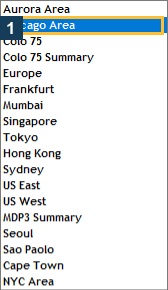
The native Rithmic 01 menu exposes specific Gateway labels. These are actual choices in that observed form, not a latency ranking or proof of availability for every provider:
What common suggestions do not prove
Moving software to a VPS changes part of the host/network environment. Reducing a measured workload can help investigate a display bottleneck. Selecting a supported gateway can test a route difference. None establishes that provider entitlement, chart context, signal generation or exchange fill behavior has been fixed.
Quantower documents its local plugin route. TradingView describes webhook delivery, including a receiver-response limit. Those are different stages. Rithmic's API performance descriptions also use their own stated measurement basis; do not present them as your account's order-to-fill benchmark.
Use the performance monitoring record to preserve comparable observations before and after changing a supported setup.
Common questions
Is ping the same as order latency?
No. A host's network response is different from application processing, broker acknowledgement and a fill.
Is the nearest gateway always fastest?
No comparison was established here. Use supported choices and measure the intended route.
Does a higher TradingView plan guarantee quicker fills?
No. Plan features do not establish the complete execution timeline.
Can a screenshot prove a millisecond claim?
A static image records visible fields at a moment. A reproducible timing method and event records are needed for elapsed-time claims.