
Start with a Gateway supported by your provider for the selected System. A geographically nearby entry can be a starting point when the provider recommends it, but its name does not guarantee the lowest latency or solve every connection failure. Keep the working route unchanged while identifying the problem; compare alternatives only when you can safely interrupt the connection.
Educational software guidance. Trading involves risk. Read the financial and information disclaimers.
Check the System first
A Gateway is an entry point, not a replacement for the account's assigned environment. Selecting Chicago Area under the wrong System does not establish a valid account connection. Obtain the issued System and supported choices before changing either field.
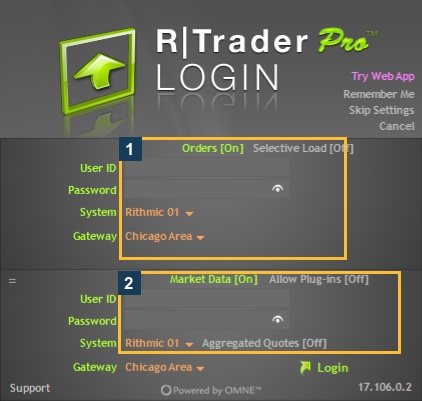
What is available in the inspected menu?
The unused Rithmic 01 form in desktop version 17.106.0.2 exposed 18 Gateway labels on 7 October 2026, including Chicago Area, Frankfurt, Singapore, Tokyo, US East and US West. The complete observed labels appear in the System and Gateway reference.
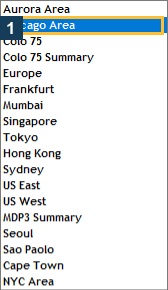
This is a Rithmic 01 menu observation. It does not prove that every entry works for Apex or another provider. Labels containing Summary or Colo may describe a different service choice; do not treat them as ordinary regional substitutes without matching instructions.
A safe selection sequence
- Record the current System, Gateway, platform version and connection route.
- Identify the failure: login rejection, timeout, missing data, delay or missing account. Preserve the error and timestamp.
- Check the provider's current guide and dated incident notices. Apex's setup guide recommends a nearby area in its own workflow; that is provider guidance, not a measured best route for every trader.
- Before a reconnect, confirm positions and working orders and identify any management performed by local software. Arrange a supported backup route where needed.
- If an alternative is supported and the interruption is appropriate, change one connection variable at a time using the matching platform instructions.
- Recheck the expected account, service indicators, exact contract and quote timestamp. Preserve both sets of observations so the provider can compare them.
Do not switch a working trading session simply to obtain a screenshot or a speed figure.
Interpret measurements carefully
| Observation | Useful conclusion | Limit |
|---|---|---|
| One gateway times out and another connects | Different behavior occurred in the recorded attempts | Does not identify the root cause |
| Network ping is lower | That host answered that network test faster | May not measure the application's actual route |
| Prices appear delayed | A timestamp or display problem warrants investigation | Does not isolate gateway, feed, chart or CPU cause |
| Quotes update after a change | Data was visible for that symbol at that time | Does not establish trading permission or fills |
No comparative latency measurements were performed for this guide. Avoid published millisecond promises without a reproducible measurement and account scope.
Common questions
Is Chicago Area always the best gateway?
No. Use a supported choice for your System and workflow. Account availability, network routing and service conditions matter alongside location.
Should I change gateways after an invalid-password error?
First verify the issued credentials and System. A password rejection and a timeout are different symptoms; changing geography is not a verified password repair.
Must Orders and Market Data use identical settings?
Follow the provider and connector's supported configuration. The presence of two sections does not authorize an arbitrary mixed environment.
Does a gateway change remove a session limit?
Do not assume so. Ask the provider which data and trading sessions are enabled for the login; see multiple-session diagnosis.