
Start with reconciled fills, account, contract, timezone and fees. Then calculate result metrics using a stated trade-grouping method. An alert log, working order or screenshot of a P&L field is not a complete performance record.
Educational software guidance. Trading involves risk. Read the financial and information disclaimers.
Obtain the correct records
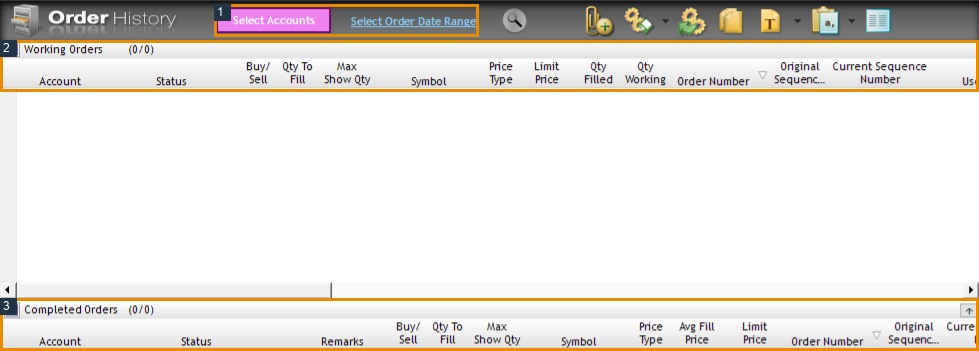
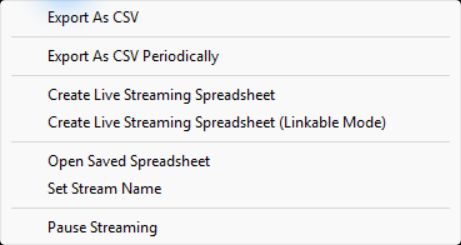
The inspected desktop exposes File → Order History and Fill History. Order History includes account/date filters; an export control was observed in the earlier native inspection. These captures were empty and do not prove a populated export, its schema or retention period.
Use the available filled-order records and verify the resulting file against the provider statement. Before importing into a journal, check that it supports the actual file format, timezone, commissions and contract naming. Do not assume every CSV importer understands a Rithmic export.
Define the metrics
| Metric | Definition and caution |
|---|---|
| Net result | Realized gross result minus applicable costs, using a stated period |
| Win rate | Winning closed trades divided by closed trades; define a trade first |
| Average win/loss | Average positive/negative result under the same cost convention |
| Profit factor | Gross winning sum divided by absolute gross losing sum; undefined if no losing sum |
| Drawdown | Peak-to-trough decline in the chosen series; realized-only and marked equity differ |
| Expectancy | Average result per defined trade over the sample; not a future-profit guarantee |
For illustration, six $100 winners and four $120 losers produce $120 before costs: $600 minus $480. Win rate is 60%, and gross profit factor is 1.25. Additional costs can reduce or reverse the net result. No universal 1.5 target or 50-trade sample establishes viability.
Reconcile before interpreting
Check partial fills, scaling, reversals, duplicates, fees and missing days. Keep each account separate before combining totals. A prop rule may monitor intraday marked equity even if a journal plots only closed-trade results. Explain the difference rather than forcing the charts to agree.
Protect private IDs and retain source records outside public reports. The figures below locate controls; they are not a real trading-performance dataset.
Screenshot references
Common questions
Is a high win rate sufficient?
No. Loss size, costs and sample behavior also matter.
Does profit factor above one prove net profitability?
Only under the stated calculation; omitted costs and sample limitations matter.
Can I import any CSV into any journal?
No. Match the actual supported schema and reconcile totals.
Is account drawdown the same as journal drawdown?
Not necessarily. They may use different equity references and timing.