
PickMyTrade documents a cloud receiving-service route for TradingView alerts to eligible Rithmic accounts. It requires a supported connection and a message generated for the intended account and alert mode. Delivery, broker acceptance and fills are separate outcomes; no processing-speed or profitability guarantee is established here.
Educational software guidance. Trading involves risk. Read the financial and information disclaimers.
What the service does in this workflow
TradingView produces the selected alert event and sends its webhook. The receiving service validates and processes the supported message for the configured account. Rithmic/account checks and the execution environment then determine the actual order result. A simulated account remains simulated even when the market-data source is live.
Connect through the documented route
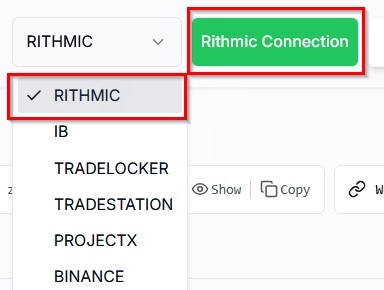
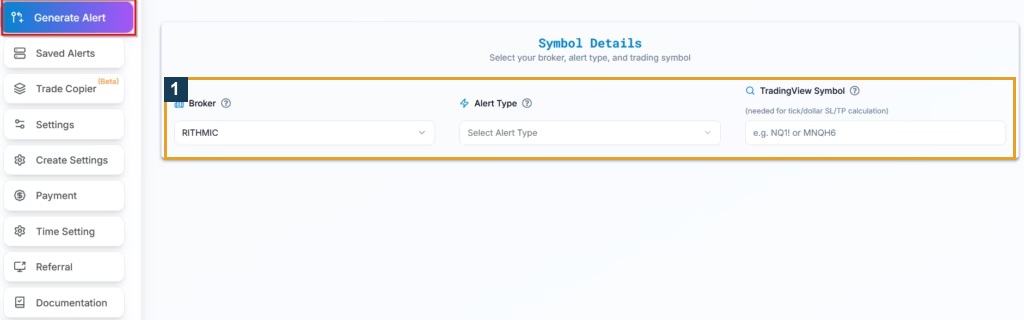
PickMyTrade's current Rithmic setup describes Rithmic-specific registration, Broker Connections, Rithmic Connection, Add Connection, matching System Name, and Connect. Then use Generate Alert for the selected indicator/strategy workflow.
The guide excludes Bulenox and says the temporary public Rithmic trial is unsuitable for its Protocol route. Do not generalize support to every Rithmic provider or infer copier support from a broker-connection list.
Select the exit and symbol behavior deliberately
The strategy guide distinguishes strategy-controlled exits, attached exits and multiple-exit arrangements. Use its generator rather than a guessed JSON template. Resolve sizing and stop/target units in the actual selected mode; the public documentation uses different unit descriptions in different contexts.
The rollover guide distinguishes contract mapping from managing an existing futures position. Inspect the resolved destination contract around rollover instead of assuming every continuous chart and receiver switch on the same date.
What still needs account-specific proof
This is a product overview based on public documentation, not a completed private-account setup. The linked setup/JSON guides retain the missing authenticated-generator and matched-outcome checks. No proprietary credential-encryption implementation, always-on availability or sub-200-millisecond benchmark was verified. Review firm permission independently and reconcile every destination before retrying a failed-looking event.
Screenshot references
Common questions
Does it work with every Rithmic trial?
No. The temporary public trial does not provide the documented Protocol route.
Does a Connected status prove fills?
No. It is a connection state, not an execution report.
Can I reuse a generic action/qty JSON example?
Use the current route-specific generated message instead.
Does cloud hosting remove all monitoring needs?
No. Check delivery, receiver responses, account state and broker records.