
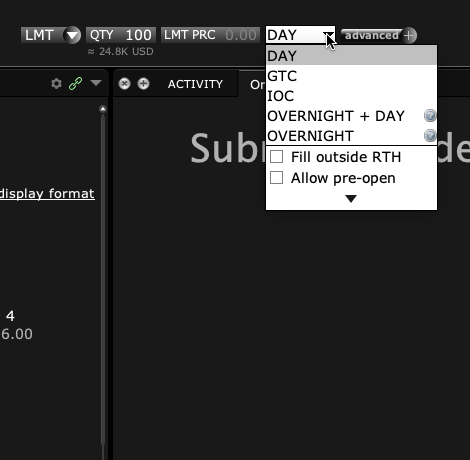
IBKR has special rules and routes for overnight trades. The Outside RTH box alone does not prove an app can send those trades. Check the product and the app’s documented overnight mode. Then read the route and hours on the actual order.
Educational software guidance. Trading involves risk. Read the financial and information disclaimers.
Step by step
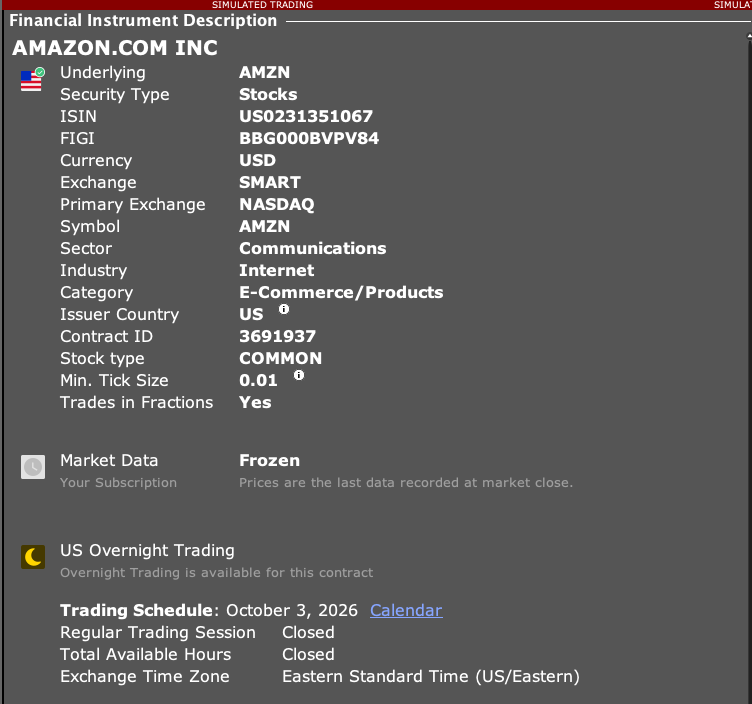
- 1 Check whether the stock or ETF is eligible for the intended IBKR overnight session.
- 2 Review the app’s documented support for overnight routing.
- 3 Inspect the actual route and overnight attributes on the proposed order.
- 4 Compare Overnight-only with Overnight plus day-session behavior before choosing a workflow.
- 5 Verify the resulting broker order rather than inferring support from a preset checkbox.
A practical example
Suppose a stock is offered in a broker’s overnight service. You still need the right route and order fields for that service. A box that allows trades before or after the main session is not enough proof. Ask the app provider to show which overnight mode it sends and where you can check that on the order. Use a paper or other supported test to inspect the request. Do not add a field to a webhook just because you saw its name in API code. The app must know how to use that field, and the broker must accept it for that product.
Screen reference
Mistake to avoid
Common questions
Does Outside RTH guarantee overnight routing?
No. Check the dedicated overnight behavior.
Does this guide confirm PickMyTrade supports every overnight mode?
No. Confirm the current app’s supported fields with its documentation or support.