Quotes and charts

TWS option chain loads but prices are blank

Quick answer

A populated chain shows contracts; it does not prove the account can receive quotes for each one. Check expiry filters, option and underlying feeds, and market hours before diagnosing the chain as broken.

Educational software guidance. Trading involves risk. Read the financial and information disclaimers.

Step by step

  1. 1 Confirm the underlying and selected expiry in the chain.
  2. 2 Choose one contract and check its Description.
  3. 3 Check whether its underlying has a current quote and whether the option has a data permission message.
  4. 4 Review the needed subscriptions under the active username.
  5. 5 Compare another valid strike in the same expiry to isolate a single-contract issue.

A practical example

The chain lists an expiry and many strikes, but the price cells are blank. The list proves that TWS found contracts. It does not prove that your user has the price feed for them. Choose one strike and inspect it closely. Check its full name, its quote status, and its underlying price. This small test is easier to explain to support than a whole empty chain.

Illustrative scenario, not a record of a trade placed during this review.

Screen reference

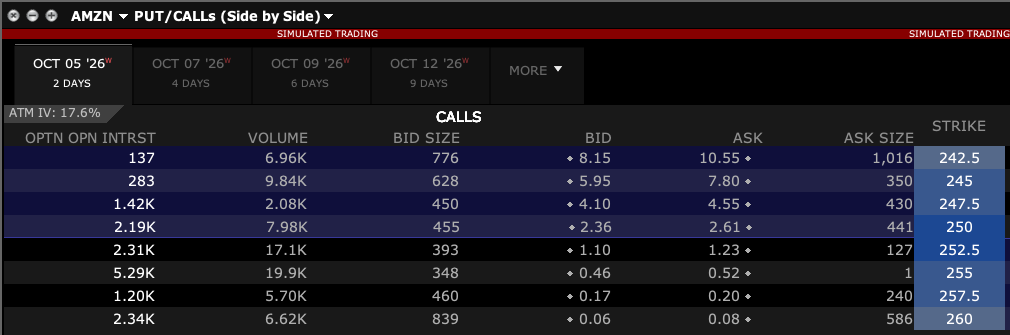
Call side of a TWS option chain with expiry tabs, bid, ask and strike columns
Compare the underlying, selected expiry and strike. These are observed paper-session values from a closed market, not evidence of a live feed or a suggested trade. Captured in TWS paper mode on 3 October 2026. Open the image for full size.
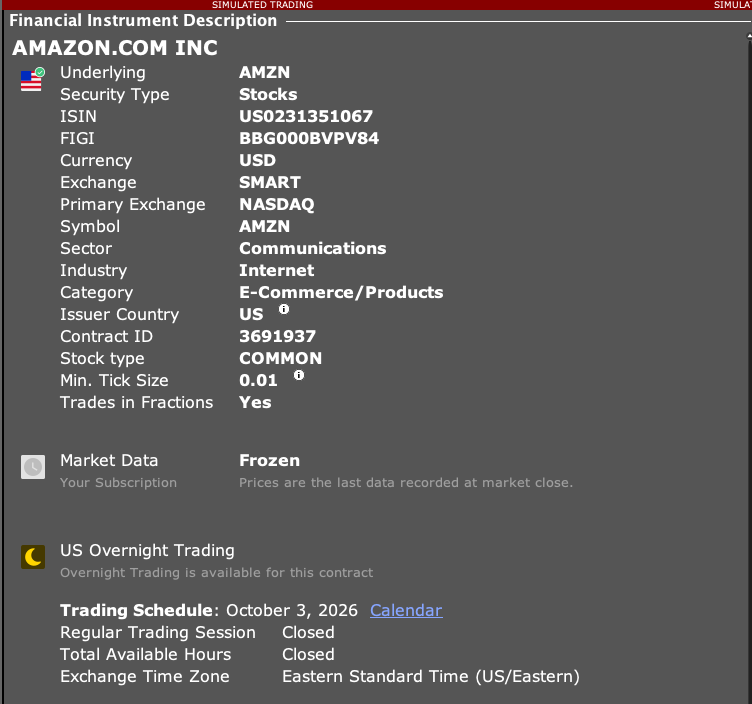
TWS stock Description showing SMART route, NASDAQ primary exchange, currency, contract ID, minimum tick and frozen data status
This stock is an example of the fields to compare. SMART routing and Primary Exchange are separate fields. The observed feed is Frozen and the market is closed; this is not a live-price or trading recommendation. Captured in TWS paper mode on 3 October 2026. Open the image for full size.
How to confirm the result The selected valid contract should show the data available under the account’s data access and session.

Mistake to avoid

An index price feed and an options feed are not interchangeable subscriptions.

Common questions

Does seeing strikes mean I have option data?

No. Contract discovery and quote data access are different.

Will all Greeks appear when a chain loads?

No. Their needed option and underlying data must also be available.

Financial and information disclaimers

Financial disclaimer

These guides explain software. They are for education, not financial, investment, tax, or legal advice. No example is a suggestion to buy or sell a product or use a trading strategy. Trading can lose money, including all funds you put at risk. With margin, futures, short sales, or some options, losses can exceed your starting funds. Automation can fail, send duplicate orders, or act late. Stops do not guarantee a fill or a price. Review your orders and positions, and seek advice from a qualified professional for your own needs. Paper trades, examples, and past results do not predict live results or promise a profit.

Information disclaimer

This is general help based on the sources and check date shown on the page. Screens, settings, fees, data access, and product support can change or differ by app version, account, country, and broker. The content may contain errors or become out of date; accuracy, completeness, and continuous service are not guaranteed. Check current broker and app instructions before acting. Screenshots show where controls are; they do not prove that an order test passed. This guide does not replace broker terms or risk notices. References to IBKR and TradingView identify their products and do not imply their endorsement of this guide.

IBKR risk disclosures · IBKR paper-trading limits · SEC guidance on automated investment tools

PickMyTrade help · Independent guidance for Trader Workstation and the desktop integration. TWS images show paper trading. Other applications are named in the image captions. Settings and availability can vary by version and account.

Automate TradingView alerts to Interactive Brokers

See the IBKR integration