
Messages 2104, 2106, and 2158 usually report successful connections to IBKR data services. Some apps display them under an error heading even though they are informational. Check for an actual failed request before changing settings.
Educational software guidance. Trading involves risk. Read the financial and information disclaimers.
Step by step
- 1 Read the message text next to the code. Look for a connection-OK description.
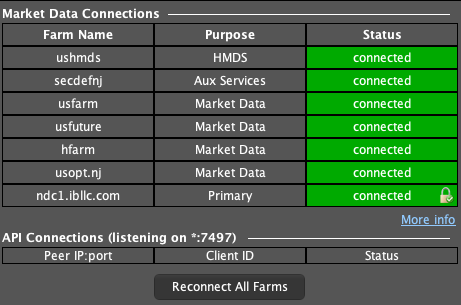
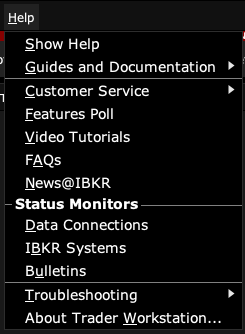
- 2 Open Help → Data Connections to compare farm purpose and status. Then check whether the app has finished connecting and can find the account.
- 3 If a quote is missing, check the quote’s own subscription or contract error separately.
- 4 Keep informational messages in the log, but avoid treating them as a reason to resend an order.
A practical example
You open an API app and see three lines marked Error, but each line says a data service is OK. Then the account and quotes appear. In that case, the heading used by the app is less useful than the words in each line. Do not restart a healthy link just to remove these notices. Look for a failed request or stale quote before deciding that there is a problem.
Screen reference
Mistake to avoid
Common questions
Why is an OK message in the error log?
The API sends informational messages through the same message callback used for errors.
Does 2158 mean an order filled?
No. It concerns a security-definition service connection.