Error messages

TWS 2103 or 2105: a data farm disconnected

Quick answer

Check which data service disconnected and whether the break persists. A live-data service and a historical-data service have different roles. Inspect the affected quotes or chart requests before deciding the whole trading session is down.

Educational software guidance. Trading involves risk. Read the financial and information disclaimers.

Step by step

  1. 1 Record the message code, service name, and time from the log.
  2. 2 Check whether the matching connection-OK message follows it.
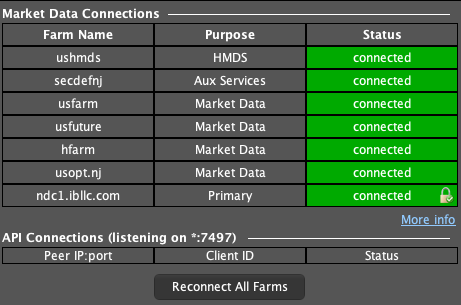
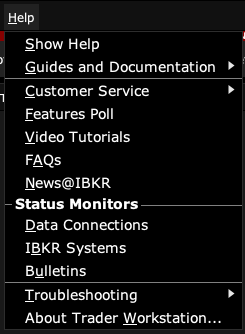
  3. 3 Open Help → Data Connections and read each farm’s Purpose and Status. Compare live quote updates with historical chart loading to find what is affected.
  4. 4 Check IBKR system status and your network if the problem persists.
  5. 5 After recovery, confirm the affected data is current before using it in a new decision.

A practical example

Suppose new chart bars fail to load but the watchlist still changes. Read which data service the notice names. A chart-history problem can be narrower than a full broker outage. Note the time, try one known chart request, and watch for the recovery message. Check orders on their own. A missing chart is not proof that an order failed to reach the broker.

Illustrative scenario, not a record of a trade placed during this review.

Screen reference

TWS Market Data Connections with farm purpose and status, plus API client columns
The observed services are connected and the API client list is empty. Use this panel to read current status; it does not reproduce a disconnect or prove an app handshake completed. Captured in TWS paper mode on 3 October 2026. Open the image for full size.
TWS Help menu with Data Connections, Troubleshooting and About commands
Use Help to find connection status, diagnostics and the installed TWS version. Captured in TWS paper mode on 3 October 2026. Open the image for full size.
How to confirm the result The affected request should work again and timestamps should advance as expected during an active market.

Mistake to avoid

Do not repeatedly restart every app for a brief service message while ignoring the actual data state.

Common questions

Does 2105 describe live quotes?

It refers to a historical-data service; read the full message.

Can an order still exist while data is stopped?

Yes. Check orders and positions independently of a data-feed message.

Financial and information disclaimers

Financial disclaimer

These guides explain software. They are for education, not financial, investment, tax, or legal advice. No example is a suggestion to buy or sell a product or use a trading strategy. Trading can lose money, including all funds you put at risk. With margin, futures, short sales, or some options, losses can exceed your starting funds. Automation can fail, send duplicate orders, or act late. Stops do not guarantee a fill or a price. Review your orders and positions, and seek advice from a qualified professional for your own needs. Paper trades, examples, and past results do not predict live results or promise a profit.

Information disclaimer

This is general help based on the sources and check date shown on the page. Screens, settings, fees, data access, and product support can change or differ by app version, account, country, and broker. The content may contain errors or become out of date; accuracy, completeness, and continuous service are not guaranteed. Check current broker and app instructions before acting. Screenshots show where controls are; they do not prove that an order test passed. This guide does not replace broker terms or risk notices. References to IBKR and TradingView identify their products and do not imply their endorsement of this guide.

IBKR risk disclosures · IBKR paper-trading limits · SEC guidance on automated investment tools

PickMyTrade help · Independent guidance for Trader Workstation and the desktop integration. TWS images show paper trading. Other applications are named in the image captions. Settings and availability can vary by version and account.

Automate TradingView alerts to Interactive Brokers

See the IBKR integration