
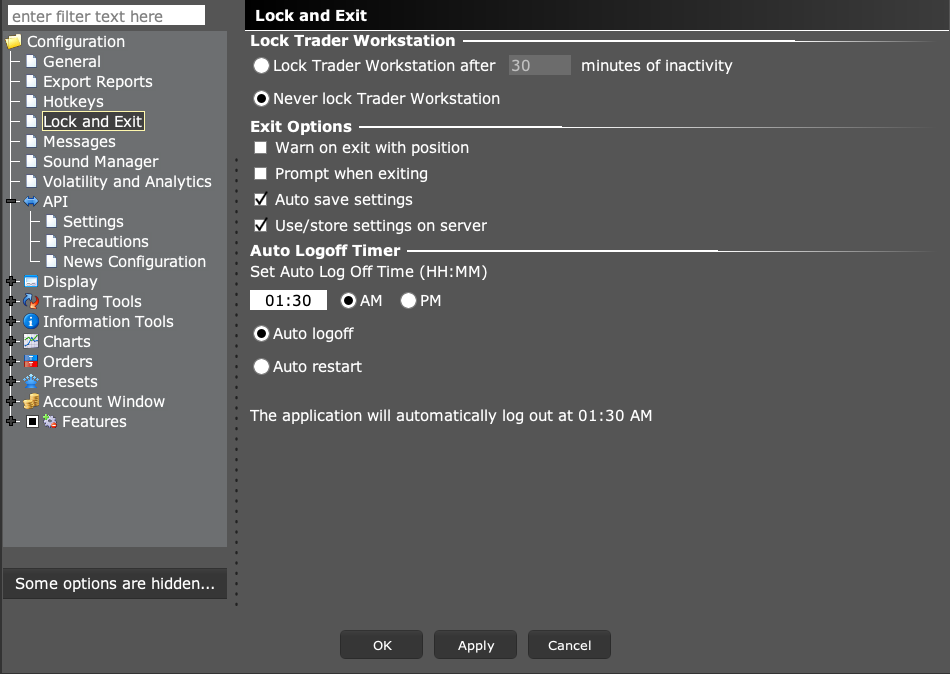
Open Global Configuration → Lock and Exit to check the restart or logoff schedule. Choose a planned pause and check the next startup. Auto restart does not guarantee continuous connectivity or remove regular sign-in requirements.
Educational software guidance. Trading involves risk. Read the financial and information disclaimers.
Step by step
- 1 Record the existing time and whether Auto logoff or Auto restart is selected.
- 2 Choose a time that fits the markets and automation you actually run.
- 3 If your account supports Auto restart and you intend to use it, select it and apply the change.
- 4 Observe the next restart and check whether the API client reconnects.
- 5 Verify account, positions, and working orders before resuming normal alerts.
A practical example
The screen says Auto logoff at a set time. You had expected the app to restart and sign back in. Read the selected radio button as well as the time. If you change the plan, watch the first full cycle. Does TWS reopen? Does it need a fresh login? Does the desktop app find the right account? Each check tells you something different. An open window alone is not the end of the test.
Screen reference
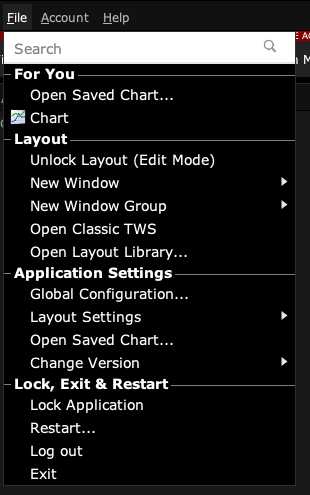
Start in Mosaic with File → Global Configuration. Then choose the panel named in the steps.
Mistake to avoid
Common questions
Can I avoid all manual logins with this?
No. Periodic broker sign-in can still be needed.
Does restarting close my positions?
Do not infer position state from the app restarting; check the broker record.