Connection and login

Why TWS disconnects when you log in to TradingView

Quick answer

Check for competing IBKR trading sessions under the same username. A direct IBKR login in TradingView is different from a webhook sent to PickMyTrade. Changing the local TWS socket port does not resolve a broker-session conflict.

Educational software guidance. Trading involves risk. Read the financial and information disclaimers.

Step by step

  1. 1 Note whether the disconnect happens exactly when you sign in to the IBKR broker panel in TradingView.
  2. 2 List other trading apps using the same IBKR username, including mobile and Client Portal.
  3. 3 Choose the trading session you need to keep active. Avoid repeatedly signing in elsewhere with that username during the test.
  4. 4 For PickMyTrade automation, check the webhook and desktop connection path described in its setup guide. A direct broker-panel login is not the same step.
  5. 5 If concurrent trading sessions are needed, ask IBKR about an extra authorized username and its separate market-data access.

A practical example

Suppose TWS works until you log in to the IBKR broker panel in TradingView. That timing points toward a login clash. A webhook-only alert does not require that same broker-panel step. Write down which path you are using. For the desktop path, the chart sends an alert to PickMyTrade and the desktop app talks to TWS. Changing the TWS port cannot fix a server that ends one login when another starts.

Illustrative scenario, not a record of a trade placed during this review.

Screen reference

Start in Mosaic with File → Global Configuration. Then choose the panel named in the steps.
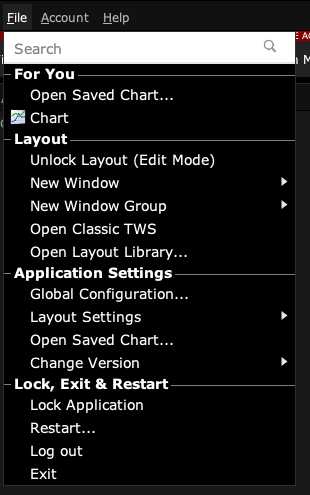
TWS Mosaic File menu with Global Configuration and Layout Settings
Open Global Configuration from File in Mosaic. This capture excludes the account header. Captured in TWS paper mode on 3 October 2026. Open the image for full size.
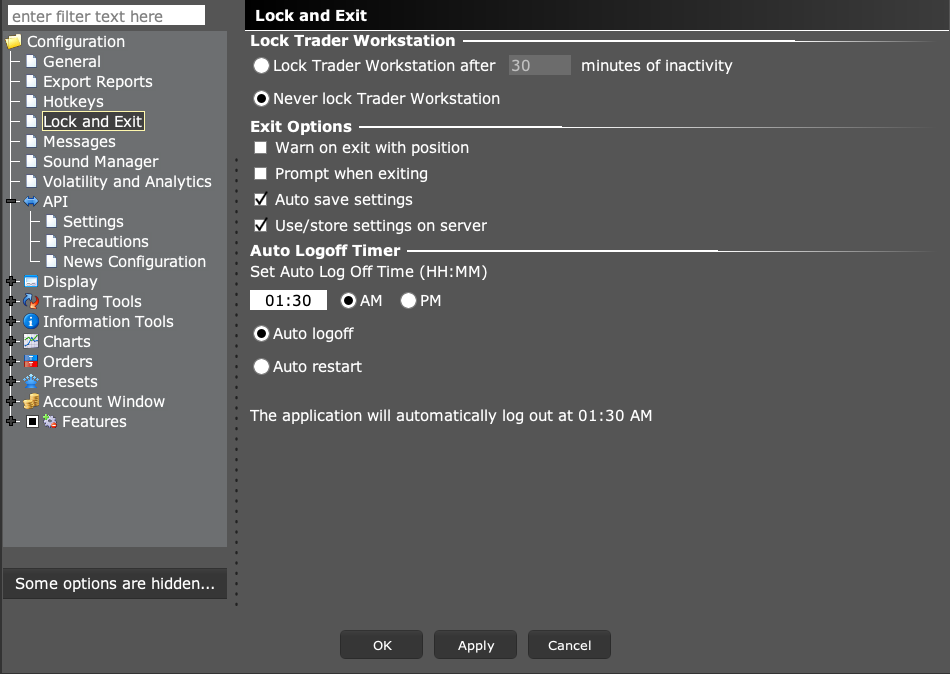
TWS Lock and Exit settings showing lock and restart controls
Compare the configured time and selected restart or logoff mode. Availability can differ by account entity. Captured in TWS paper mode on 3 October 2026. Open the image for full size.
How to confirm the result TWS should remain connected when the competing login is removed. If not, investigate network or restart events separately.

Mistake to avoid

Do not interpret a community workaround as permission to bypass IBKR session rules.

Common questions

Does changing 7497 fix this?

No, if the broker is ending a competing login session.

Will a second username share all paid data automatically?

Do not assume so. IBKR says live usernames have separate market-data subscriptions.

Financial and information disclaimers

Financial disclaimer

These guides explain software. They are for education, not financial, investment, tax, or legal advice. No example is a suggestion to buy or sell a product or use a trading strategy. Trading can lose money, including all funds you put at risk. With margin, futures, short sales, or some options, losses can exceed your starting funds. Automation can fail, send duplicate orders, or act late. Stops do not guarantee a fill or a price. Review your orders and positions, and seek advice from a qualified professional for your own needs. Paper trades, examples, and past results do not predict live results or promise a profit.

Information disclaimer

This is general help based on the sources and check date shown on the page. Screens, settings, fees, data access, and product support can change or differ by app version, account, country, and broker. The content may contain errors or become out of date; accuracy, completeness, and continuous service are not guaranteed. Check current broker and app instructions before acting. Screenshots show where controls are; they do not prove that an order test passed. This guide does not replace broker terms or risk notices. References to IBKR and TradingView identify their products and do not imply their endorsement of this guide.

IBKR risk disclosures · IBKR paper-trading limits · SEC guidance on automated investment tools

PickMyTrade help · Independent guidance for Trader Workstation and the desktop integration. TWS images show paper trading. Other applications are named in the image captions. Settings and availability can vary by version and account.

Automate TradingView alerts to Interactive Brokers

See the IBKR integration