
If the app stops after you leave TWS idle, check Lock and Exit. Also check whether the computer went to sleep. These are different controls. Some IBKR account regions have different lock rules, so a box shown in another guide may not exist for your account.
Educational software guidance. Trading involves risk. Read the financial and information disclaimers.
Step by step
- 1 Note whether the break follows a consistent period without user activity.
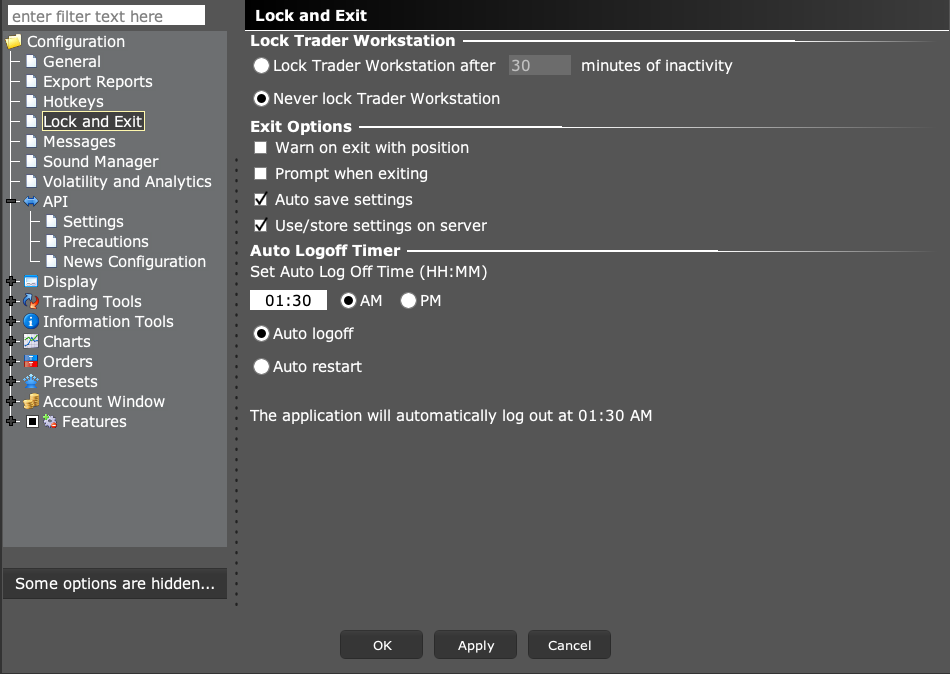
- 2 Open Lock and Exit and read the current inactivity control.
- 3 Compare the available controls with IBKR’s entity-specific API guidance.
- 4 Choose a supported operating setup that also keeps access to the machine controlled.
- 5 Observe one planned idle period and check the API connection afterward.
A practical example
An app works while you are at the desk but stops after you leave it alone. Write down how long the gap was. Then look at TWS Lock and Exit. Also note whether the Mac or PC went to sleep. Those are two separate events. Some accounts do not offer the same TWS lock choices as others. If a control is missing, check the broker’s rule for your account before reinstalling the app. A screenshot from a friend’s account may show a choice your account does not have. Keep the computer secure while you choose a supported way to run it.
Screen reference
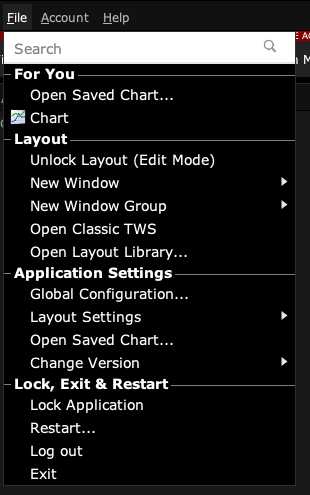
Start in Mosaic with File → Global Configuration. Then choose the panel named in the steps.
Mistake to avoid
Common questions
Why is Never lock missing?
IBKR documents regional differences, including limitations for IBHK users.
Can I assume Gateway behaves identically?
Check IBKR’s account-specific guidance; do not infer it from TWS alone.