
API → Precautions lets you skip some order warnings. Read the full warning first. Find the one box that matches it and learn what the box skips. Do not turn them all on just to make an alert work. Keep the checks your workflow still needs.
Educational software guidance. Trading involves risk. Read the financial and information disclaimers.
Step by step
- 1 Capture the full warning or rejection and identify the affected order type.
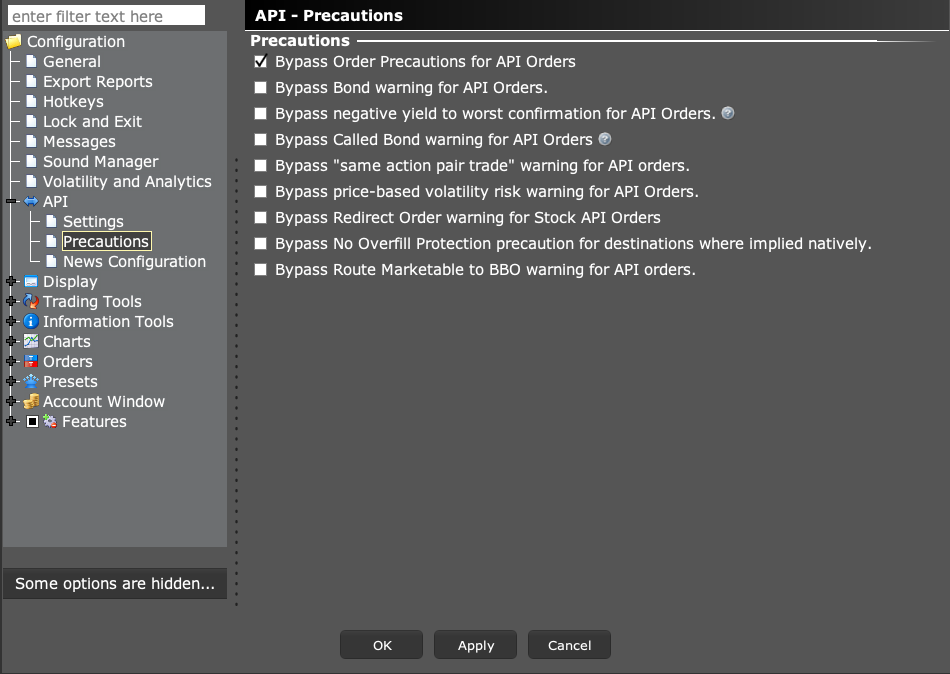
- 2 Open Global Configuration → API → Precautions.
- 3 Read the specific bypass label and compare it with the warning you received.
- 4 If the workflow requires a supported bypass, document why and test the intended behavior in paper trading.
- 5 Review size, price, and exit controls in the app before using the setup live.
A practical example
Think of each bypass box as a separate choice. One relates to bonds, another to a price risk, and another to a route. Your stock alert does not need every box checked just because it uses the API. Match the full warning to the exact control. If you cannot explain what a box will skip, leave it alone and ask support. A working connection is not a reason to remove unrelated order checks. The screenshot shows the controls, not a list of boxes everyone should enable.
Screen reference
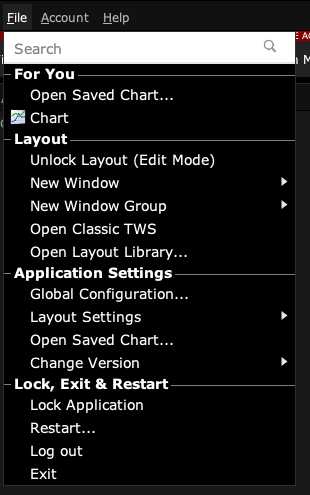
Start in Mosaic with File → Global Configuration. Then choose the panel named in the steps.
Mistake to avoid
Common questions
Will a bypass fix missing trading permission?
No. Broker permissions are separate.
Is this the same as Read-Only API?
No. Read-only controls order request broadly; these settings concern particular precautions.