
Record the installed application's build and consult its official product/release information. The inspected desktop was 17.106.0.2; the earlier web session was 3.4.0.0. They are different products and version sequences. Neither observation proves which release is currently recommended for every provider or that an update resolves your particular error.
Educational software guidance. Trading involves risk. Read the financial and information disclaimers.
Find the installed build
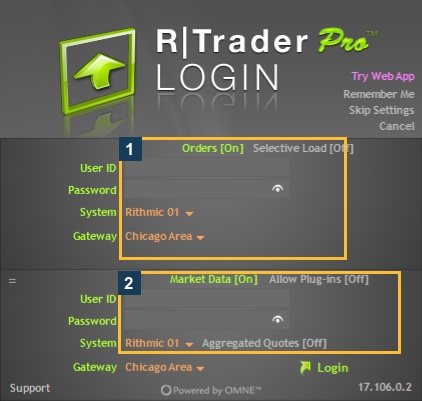
The empty desktop login shows its build at the bottom right. If another interface uses a Help/About view, use that interface's current controls. Do not compare a web number numerically with a desktop number to decide which is newer.
Read the matching official information
Start at Rithmic's RTrader Pro product page and your provider's supported installation guide. Inspect the release-note date, version and affected feature. The indexed product page displayed an older release-note excerpt than the installed build recorded here; that excerpt is not proof that the installed build is unsupported or that the excerpt is the latest full changelog.
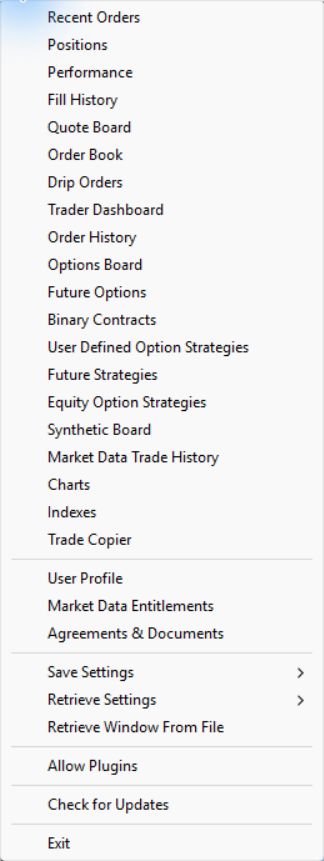
The previously inspected native File menu includes Check for Updates. This screenshot establishes the control's location in that inspection; the update command was not executed and no package was installed.
Make an update decision deliberately
- Record the current application/build, account environment and exact problem.
- Find a dated official note that actually addresses the affected feature or prerequisite.
- Confirm the build supported by your provider and any dependent plugin/client.
- Preserve the existing settings and required records through the supported process.
- Plan the interruption after establishing positions, orders and local management dependencies.
- After a supported update, verify connection, account, data and required workflow separately.
Do not restart or uninstall a running trading workflow solely to make a screenshot. A saved settings file is not proof that every connector and entitlement will transfer correctly.
What counts as evidence of a fix?
| Evidence | What it establishes |
|---|---|
| Release note names a correction | Vendor documents that change for that release |
| New build displayed | The application reports that build |
| Earlier error no longer appears in a scoped check | That check did not reproduce it |
| Required account/order workflow verified | Evidence for that recorded workflow, not every future outcome |
Keep these stages separate when writing a troubleshooting article. Do not label a current account-specific defect “fixed” merely because a newer installer exists.
Common questions
Is 17.106.0.2 definitely the newest desktop release?
This guide records the installed build, not a universal latest-release claim. Check the current official download and provider instructions.
Why is my web version much lower?
Different applications can have separate version sequences. Compare the correct product's release information.
Does Check for Updates install anything immediately?
This review did not execute it. Follow the current supported update procedure and review any prompts before applying changes.
Should an update be my first response to a login error?
Preserve the error and check issued settings, account status and service notices first. Update when official guidance matches the problem or supported-version requirement.