
Use official provider/download links, protect each login and keep passwords or tokens out of screenshots, alerts and ordinary support messages. Recover a broker-issued Rithmic password through the issuer's supported process. This guide offers account-handling practices; it does not certify Rithmic's encryption implementation, a bridge's security or universal two-factor authentication support.
Educational software guidance. Trading involves risk. Read the financial and information disclaimers.
Separate the credentials you use
Provider dashboards, Rithmic trading connections, platform licenses and automation services can have different logins. Apex's login guide explicitly distinguishes website and RTrader credentials.
Store credentials securely and avoid reusing passwords across unrelated accounts. Enable additional authentication where the actual service supports it; do not assume a control exists in every Rithmic interface. Microsoft's security guidance covers password protection, updates, malicious links and device protection.
Use the real login layout as a privacy checklist
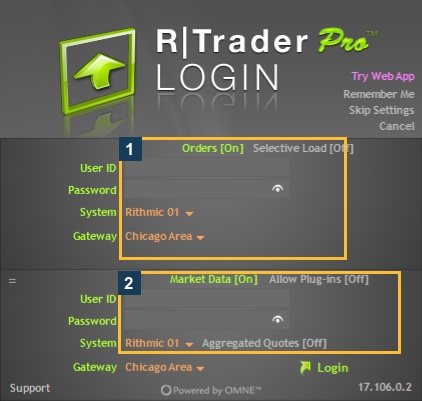
Before sharing a capture, inspect both Orders and Market Data fields. Also check the title bar, account selectors, history rows, order identifiers and any provider dashboard shown behind the application. A masked password does not automatically make the full screenshot safe to publish.
For a public help image, use an empty-field layout or a bounded crop that retains the relevant control. Keep private original captures separately. Label any redaction so readers understand what was hidden; never substitute fabricated account or order information.
Download and support precautions
- Reach installation and recovery links from the provider or Rithmic's official site.
- Confirm the domain before entering a password or downloading a file.
- Keep the operating system, browser and supported applications updated using their official processes.
- Preserve firewall protection. Investigate a documented application restriction with a narrow exception rather than opening every port or disabling protection.
- Give support the error, time, version and connection context. Do not give it your password.
Microsoft explains firewall-exception risks. A trading connection problem alone does not justify a broad security change.
If credentials may have been exposed
Use the issuer's official recovery/support process promptly and tell it which credential was affected. Elite Trader Funding's guide provides one provider-specific recovery route. Inventory dependent connections before a password change interrupts them; also establish any active account/order state through the supported process.
Remove exposed material from places you control and follow the relevant service's token/password replacement instructions. Removing a public file does not prove that its contents were never copied. If the credential was an alert bridge token, update that service and the configured alerts according to its actual documentation; a Rithmic password reset is a different task.
What this review does not claim
The Rithmic FAQ states that support cannot retrieve a password and tells users not to send one. That does not disclose every storage, network or third-party implementation detail. No penetration test, credential-storage inspection or provider-security certification was performed here. Do not add an unsupported cipher, protocol version or compliance label to a help article.
Common questions
Is a blurred screenshot enough?
Check the full image. Other fields, window titles or history rows may still identify the account. Opaque redaction or a focused crop is easier to verify than a light blur.
Should I send a password so support can test the login?
Do not send it in an ordinary support message. Follow the issuer's authorized recovery/investigation process.
Is Remember Me required?
No requirement was established by this review. Consider who can access the device and what the actual option stores; the inspected label alone does not establish its implementation.
Does cloud hosting prove an automation service is secure?
No. Review the actual service's documented controls and credential handling. Hosting location is not a security certification.