
Use Trader Dashboard for account-level inspection, then reconcile fills, positions, fees and the provider reporting period. A displayed P&L number is not automatically the number used by every loss rule. Compare the same account and time window before treating a difference as an error.
Educational software guidance. Trading involves risk. Read the financial and information disclaimers.
Locate the native account view
In the inspected desktop, open File → Trader Dashboard. The screenshot shows separate account rows, a P&L column and downside/upside auto-liquidation remaining columns. Names and balances are concealed. This evidence does not establish a universal net-liquidation or available-margin field.
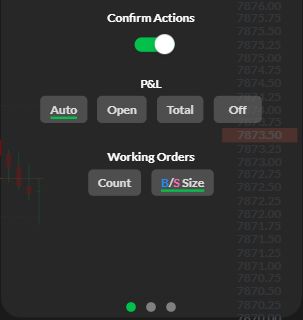
For instrument detail, use Positions and the order/fill histories. R Trader Pro Web also exposes P&L: Auto / Open / Total / Off in the instrument settings. Those choices change the display; they do not create a loss limit.
Reconcile a discrepancy
| Compare | Possible explanation |
|---|---|
| Account and expiry | Different account, contract or stage selected |
| Start/end timestamps and timezone | Different session boundaries |
| Open versus closed trades | Unrealized P&L included on one side only |
| Fees and commissions | Gross versus net result |
| Current position and fill quantity | Missing, partial or delayed records |
| Price used to mark the position | Different snapshot or valuation reference |
For illustration, $100 gross realized profit less $8 costs is $92 net realized profit. Adding a current $30 unrealized loss gives $62 under that illustrative combined definition. A provider may define its monitored criterion differently; use its published definition rather than labeling every difference a delay.
Connect monitoring to the actual rule
Rithmic's risk documentation describes multiple account criteria. Establish whether the applicable rule uses equity, realized result, open P&L, a peak or an end-of-day value. The limit's evaluation period and a dashboard's reporting period can differ.
Do not rely on an undocumented P&L alert menu or a generic percentage threshold. Keep the provider's rule and your current orders visible. Monitoring alone does not prevent slippage, liquidation or a breach.
Screenshot references

Common questions
Why does the firm dashboard differ?
First compare account, period, open exposure, costs and update time. Ask the provider about unexplained differences.
Does P&L reset at midnight?
The provider defines the reporting period; local calendar midnight is not universal.
Are blank headroom cells zero?
No. The capture does not establish their meaning for this account.
Does changing the web P&L display change my risk rule?
No. Display selection and server risk configuration are different controls.